
Official Odoo Silver Partner
Odoo Integration Services
Odoo integration is the work of connecting Odoo ERP with the other systems your company uses, so orders, payments, stock, invoices and customer data move between them automatically. OzonLayer designs, builds, tests and supports those connections, using Odoo’s standard connectors first and the External JSON-2 API or webhooks where needed.
As an official Odoo Silver Partner, we integrate Odoo Community and Enterprise on Odoo Online, Odoo.sh or your own servers, for companies in the UK, Saudi Arabia and other markets.
API & webhooks
JSON-2 API and automation rules
CE & EE
Community and Enterprise
Silver
Official Odoo partner
Scope
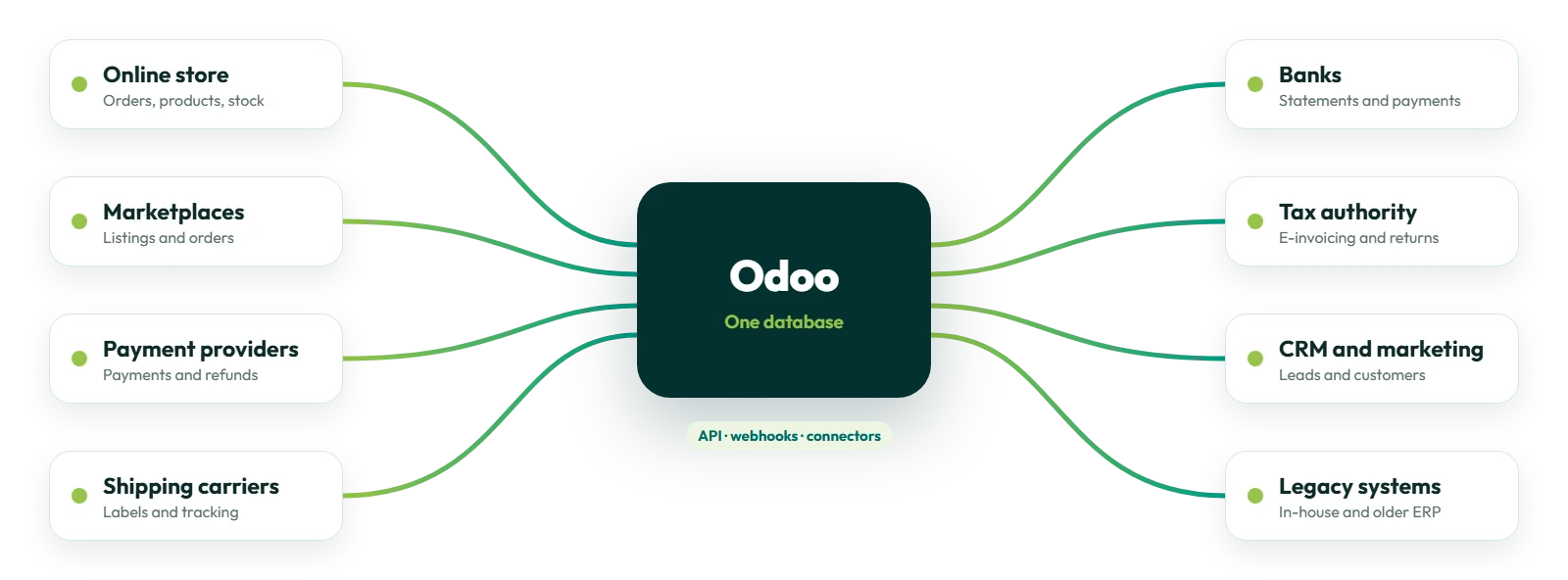
What we connect
- Online stores and marketplaces
- Payment providers and banks
- Shipping carriers
- E-invoicing and tax portals
- CRM, marketing and analytics tools
- Older ERP and in-house systems
On Odoo Online, the external API needs Odoo’s Custom pricing plan.
What we connect
What Do Odoo Integration Services Include?
Odoo integration services remove double entry between Odoo and the systems around it. Most projects connect one or more of these six areas.
Commerce
Online stores and marketplaces
Orders, customers, products, prices and stock kept in step between Odoo and your sales channels. See our Odoo Salla integration.
Payments
Payments and banking
Payment providers Odoo supports, bank statement synchronization and payment files, plus custom connections where no standard one exists.
Shipping
Shipping and logistics
Carrier rates, shipping labels and tracking numbers on delivery orders, and connections to warehouse or fulfilment partners.
Tax
E-invoicing and tax
Electronic invoices and tax reports sent to the authority through Odoo’s fiscal localizations, such as ZATCA e-invoicing in Saudi Arabia.
Customers
CRM, marketing and analytics
Leads, customers and sales data shared with CRM, marketing and reporting tools, so every team works from the same records.
Legacy
Older ERP and in-house systems
Two-way connections with systems that stay in use alongside Odoo, built on the External JSON-2 API. See Odoo development services.
How we work
How Does an Odoo Integration Project Work?
Every integration follows six steps, so nothing touches your live data until it has been tested end to end.
A standard connector can be set up quickly; a custom two-way integration is built and tested one data flow at a time.
Odoo development services →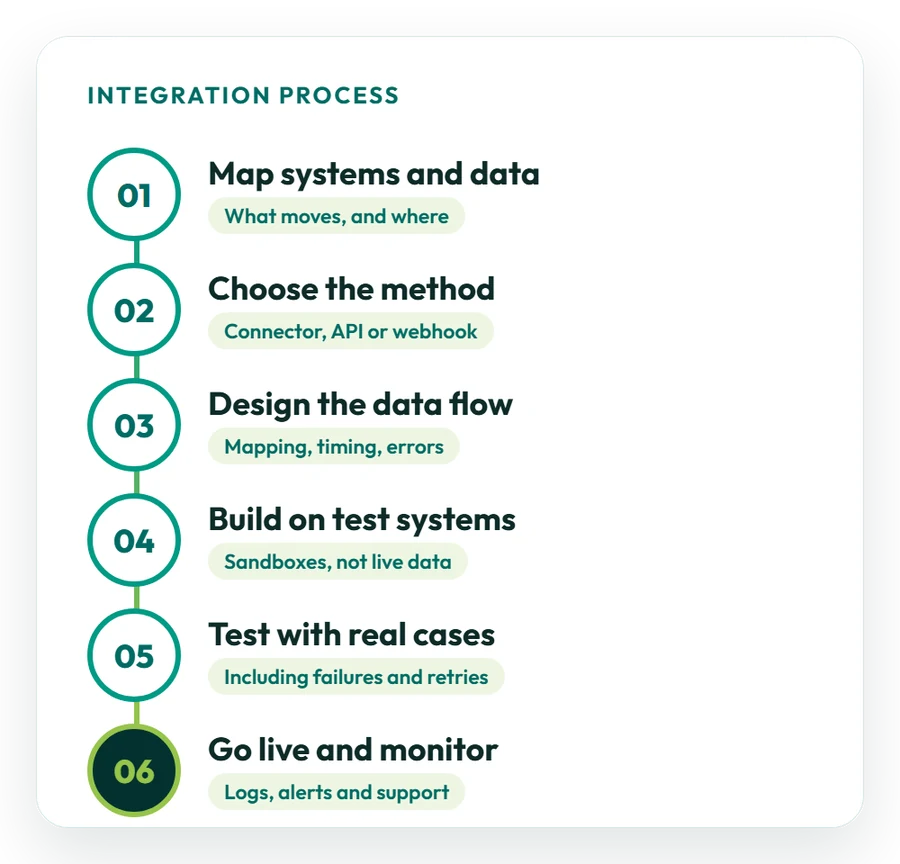
01
Map systems and data
We list every system involved and the data that moves between them: orders, products, stock, payments, invoices or customers.
02
Choose the method
Each data flow is matched to a standard connector, the External JSON-2 API, webhooks or a file exchange, and you receive a written estimate.
03
Design the data flow
We agree which system owns each record, how fields map, how often data moves and what happens when something fails.
04
Build on test systems
The integration is built against test databases and sandbox accounts, never against live data first.
05
Test with real cases
Your team tests real scenarios, including failed payments, cancelled orders, duplicates and retries, before sign-off.
06
Go live and monitor
We switch the integration on, watch the first live transactions and support it afterwards through Odoo support.
Choosing the method
Which Odoo Integration Method Fits Your Systems?
Use a standard connector where one exists; build on the API or webhooks only where it does not.
We recommend a method for each data flow and explain the trade-offs in cost, speed and upkeep.
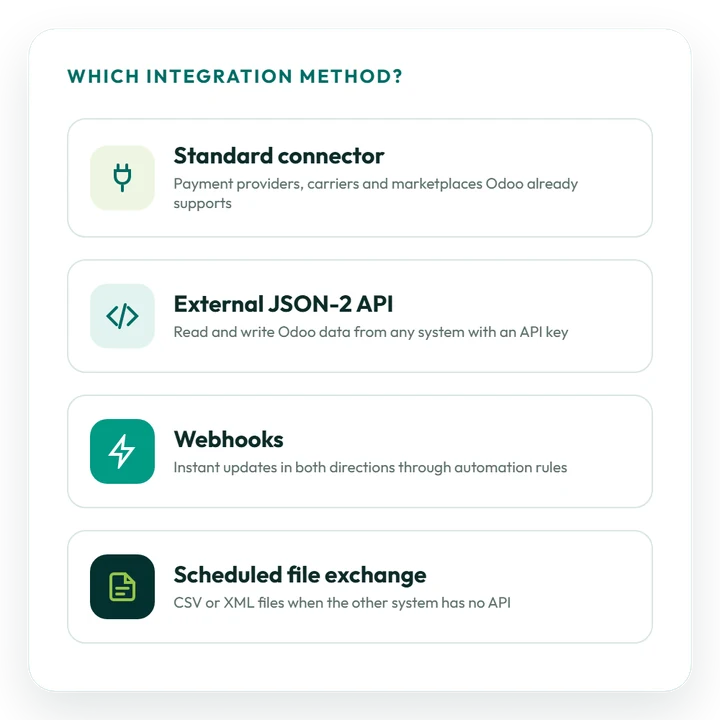
Standard connector
Payment providers, shipping carriers, bank synchronization and other connections that Odoo already supports, configured rather than built.
External JSON-2 API
Another system reads and writes Odoo data over HTTP with an API key. It replaces the older XML-RPC and JSON-RPC API.
Incoming webhooks
An automation rule gives Odoo a webhook URL, so another system can trigger an update the moment something happens.
Outgoing webhooks
An automation rule sends data to another system’s webhook when a record is created or changed in Odoo.
Scheduled file exchange
CSV or XML files exchanged on a schedule, for systems that have no API.
Integration platform
When many applications are connected, an integration platform can sit in the middle; it still talks to Odoo through the API.
Latest release
What Does Odoo 20 Change for Integrations?
Odoo 20 was released in September 2026. New integrations should be built on the External JSON-2 API, and integrations on the older API need a migration plan. Changes from the official documentation and release notes:
- External API: the XML-RPC and JSON-RPC API has been deprecated since Odoo 19; its database service was removed in Odoo 20 and its other services are scheduled for removal in Odoo 22. The External JSON-2 API replaces it;
- API keys: each key needs a description and a duration, after which it stops working, and keys can be limited to a scope;
- MCP: the database can be connected to AI tools through the Model Context Protocol;
- New standard integrations: paying bills through a payment initiation service, two-way sync with several Google calendars, and GA4 eCommerce events that follow the GA4 specification more closely;
- Plans: access to the external API is only available on Odoo’s Custom pricing plan.
Sources: the External JSON-2 API documentation and the official Odoo 20 release notes. Integrations still on XML-RPC or JSON-RPC can be moved to the JSON-2 API before those endpoints are removed.
Odoo migration services →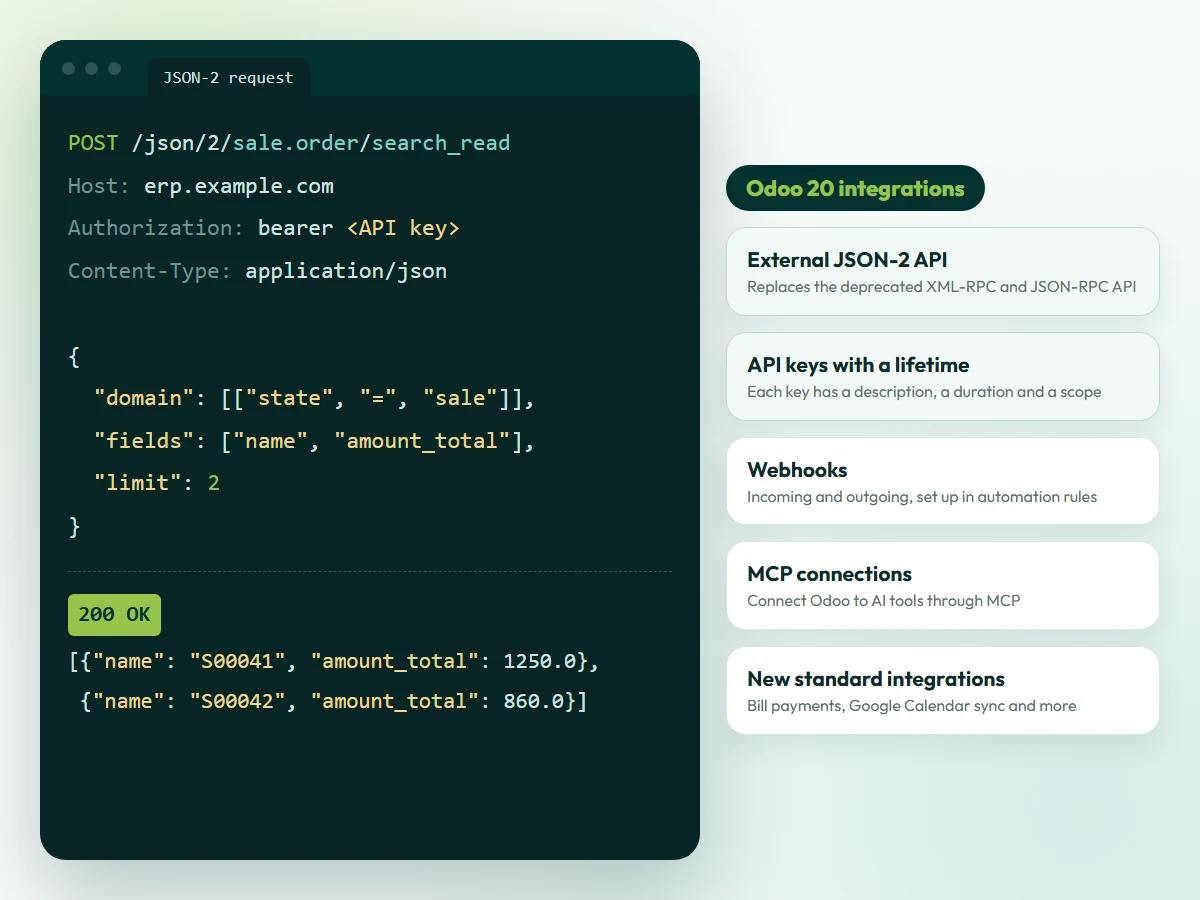
Illustration. The request is an example; the changes listed come from the official Odoo documentation and release notes.
Reliability
How We Build Odoo Integrations You Can Rely On
An integration has to keep working when volumes grow and things go wrong. Four rules keep data correct in every connected system.
Owner
One owner for each record
Each type of data has one system of record, so the same order or product is never edited in two places.
Errors
Logs and alerts
Every exchange is logged, and failures raise an alert instead of disappearing quietly.
Retries
Safe retries
Failed calls can be repeated without creating duplicate orders, payments or invoices.
Access
Secure access
A dedicated integration user with only the access rights it needs, and API keys with a limited lifetime.
Before you start
How Should You Prepare for an Odoo Integration?
Good preparation gives you a more accurate estimate and a faster start.
Not sure which systems to connect first? Our consultants can review your processes and recommend priorities.
Odoo consulting services →01
List the systems
Name every application involved, its owner on your side and the data you want to move.
02
Share API access
Collect the other system’s API documentation and a test (sandbox) account we can build against.
03
Decide who owns the data
Agree which system is the master for products, prices, stock, customers and orders.
04
Describe volumes and timing
Estimate daily orders or transactions, and decide what must move instantly and what can move on a schedule.
05
Confirm plan and hosting
Tell us your Odoo version, edition and hosting; on Odoo Online, the external API needs the Custom plan.
Timeline and cost
How Much Does Odoo Integration Cost?
It depends on scope. Setting up a standard connector is usually a short piece of work; a custom two-way integration with another system takes longer and is often delivered one data flow at a time.
What affects cost and timeline
- the number of systems and types of data;
- one-way or two-way synchronization;
- the quality of the other system’s API and documentation;
- transaction volumes and real-time needs;
- error handling, logging and monitoring;
- your Odoo plan, version and hosting.
Subscriptions for Odoo and for the other systems are billed separately from integration work.
Request an integration estimate →Typical integration sizes
These examples are indicative; your estimate confirms scope after the mapping step:
- Connector setup: a payment provider, shipping carrier or bank connection that Odoo already supports;
- One-way integration: data sent from one system to the other, such as orders into Odoo;
- Two-way integration: several data types kept in step in both directions, delivered one flow at a time.
You receive a written estimate before any work starts.
Case studies
Odoo Integration Projects We Have Delivered
Examples from different industries. See all case studies.
Retail
Salla and Salesforce
How Match Perfumes connected Odoo with Salla and Salesforce through direct REST APIs and real-time webhooks. Read the case study
E-invoicing
ZATCA Phase 2
How Industrial Steel Solutions connected Odoo Accounting to ZATCA for automated e-invoice clearance and reporting. Read the case study
IT services
Projects to invoices
How DPSIT connected sales, projects, timesheets and accounting, and made project billing 40% faster. Read the case study
Restaurants
POS to accounting
How Sweet & Salty connected point of sale, ingredients, purchasing and accounting in one system. Read the case study
Why OzonLayer
Why Choose OzonLayer for Odoo Integration?
Facts you can check before you speak to us.
01
Official Odoo Silver Partner
OzonLayer IT Services is listed as a Silver Partner in the Odoo partner directory, with customer references published on our partner page.
02
Consultants and developers together
Functional consultants map the business process, and in-house developers build the integration on the API or webhooks.
03
Support after go-live
The team that builds your integration also monitors it, fixes issues and updates it when either system changes.
04
International delivery
Offices in London, Riyadh and Pakistan, with projects for businesses in the UK, Saudi Arabia, the UAE and other markets.
Need a local team? See Odoo integration in the UK, Saudi Arabia, the UAE or Pakistan.
Related services
Related Odoo Services
FAQs
Odoo Integration: Frequently Asked Questions
Can’t find what you need? Our team replies to every enquiry with a straight answer on scope, timeline and budget.
Ask an integration expert
What are Odoo integration services?
Odoo integration services connect Odoo ERP with the other systems a company uses, such as online stores, marketplaces, payment providers, banks, shipping carriers, tax portals and CRM tools, so data moves between them automatically. OzonLayer designs, builds, tests and supports these connections.
Which systems can Odoo integrate with?
Any system that offers an API, webhooks or file exports can be connected. Many payment providers, shipping carriers and bank connections are available as standard in Odoo; other systems are connected through the External JSON-2 API, webhooks or a scheduled file exchange.
What is the Odoo External JSON-2 API?
It is the API, introduced in Odoo 19, that lets other systems call Odoo over HTTP at /json/2/<model>/<method>, authenticated with an API key. It replaces the older XML-RPC and JSON-RPC API.
Do integrations built on XML-RPC or JSON-RPC need to be replaced?
They should be planned for migration. The XML-RPC and JSON-RPC API has been deprecated since Odoo 19, its database service was removed in Odoo 20, and its other services are scheduled for removal in Odoo 22. Moving to the External JSON-2 API avoids a forced change later.
Can Odoo Online be integrated with other systems?
Yes. Standard connectors and webhooks work on Odoo Online, and Odoo's documentation states that access to the external API is only available on the Custom pricing plan. Custom Python modules cannot be installed on Odoo Online, so integration logic runs in the other system or on a separate service.
Does Odoo support webhooks?
Yes. Automation rules can give Odoo a webhook URL that another system calls when an event happens, and can send data to another system's webhook when a record is created or changed in Odoo.
How much does Odoo integration cost?
Cost depends on the number of systems and data types, one-way or two-way synchronization, the quality of the other system's API, volumes, and the error handling and monitoring needed. You receive a written estimate after the mapping step. Software subscriptions are billed separately.
How long does an Odoo integration take?
Setting up a standard connector is usually a short piece of work, while a custom two-way integration takes longer and is often delivered one data flow at a time. We confirm the timeline in the estimate, including time for testing by your team.
How do you keep Odoo integrations secure?
Each integration uses a dedicated user with only the access rights it needs, API keys with a limited lifetime and encrypted HTTPS connections. Exchanges are logged so that every change can be traced.
What happens when an integration fails?
Failures are logged and raise an alert, and failed calls can be retried without creating duplicate records. After go-live, the integration is monitored and supported, and updated when either system changes.
Can Odoo connect to e-invoicing and tax authority systems?
Yes. Odoo's fiscal localizations include e-invoicing and tax reporting for several countries, such as ZATCA e-invoicing in Saudi Arabia. Where no standard connection exists, a custom integration can be built on the authority's API.
Official Odoo Silver Partner
Connect Odoo with the systems you already use
Tell us which systems you want to connect, what data should move between them and which Odoo version and hosting you use. We will review the setup and send you a written estimate with the recommended method.
Call UK +44 7477 204638 · KSA +966 56 434 5818 · Email info@ozonlayer.com