
Official Odoo Silver Partner
Odoo Customization Services
Odoo customization is the work of adapting Odoo ERP to the way your company works: fields and screens, reports and documents, workflows, approvals, automation rules and dashboards. OzonLayer customizes Odoo with standard configuration and Odoo Studio first, and with custom modules where code is needed.
As an official Odoo Silver Partner with certified Odoo consultants, we customize Odoo Community and Enterprise on Odoo Online, Odoo.sh or your own servers, for companies in the UK, Saudi Arabia and other markets.
Studio & code
No-code and custom modules
CE & EE
Community and Enterprise
Silver
Official Odoo partner
Scope
What we customize
- Forms, lists and Kanban views
- Fields and data structure
- PDF reports and documents
- Workflows, approvals and automation rules
- Dashboards and spreadsheets
- Access rights, portal and website forms
Configuration and Studio work on Odoo Online; custom modules need Odoo.sh or your own servers.
What we customize
What Do Odoo Customization Services Include?
Odoo customization services change how Odoo looks and behaves for your users, without rebuilding what the standard apps already do. Most work falls into six areas.
Screens
Forms, lists and views
New fields, reordered tabs and buttons, Kanban stages and list columns, so each screen shows what your team needs.
Documents
Reports and documents
Branded quotations, invoices, delivery slips and certificates, built in the Studio report editor or as QWeb templates.
Workflow
Workflows and approvals
Statuses, approval steps and limits that match how your company signs off orders, purchases and expenses.
Automate
Automation rules
Rules that send emails, schedule activities or update records when a condition is met, so routine steps happen on their own.
Insight
Dashboards and spreadsheets
Spreadsheet dashboards with pivot tables, charts and global filters on live Odoo data.
Access
Access rights and portal
User groups and access rights for each role, plus portal pages and website forms for customers and suppliers.
How we work
How Does an Odoo Customization Project Work?
Every request follows six steps, so changes reach your live database only after your key users have approved them.
Small changes move through the steps quickly; larger packages are delivered in phases, one department at a time.
Odoo development services →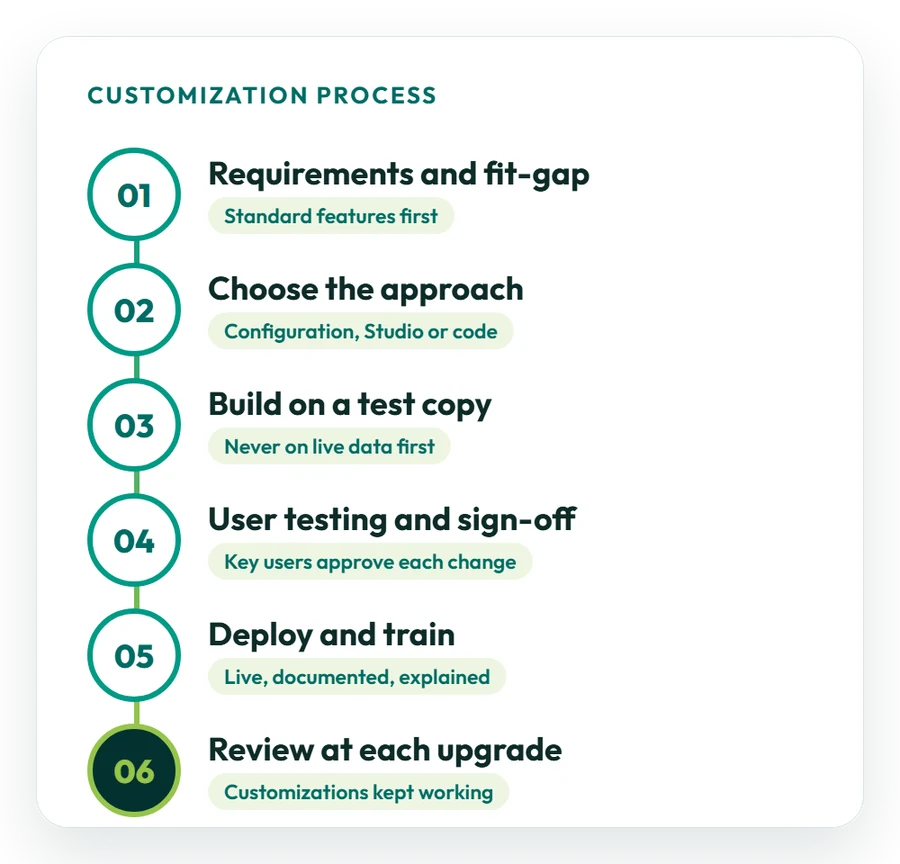
01
Requirements and fit-gap
We map the process, collect examples of the screens and documents you use, and check what standard Odoo already covers.
02
Choose the approach
Each change is matched to configuration, Odoo Studio or a custom module, and you receive a written estimate.
03
Build on a test copy
Changes are made on a copy of your database first, never directly on live data.
04
User testing and sign-off
Your key users test every change with real examples and approve it before it goes live.
05
Deploy and train
Approved changes are moved to your live database, documented and explained to the people who use them.
06
Review at each upgrade
Customizations are checked and adjusted when you move to a new Odoo version. See Odoo support.
No-code or code
What Can Odoo Studio Do, and When Do You Need Code?
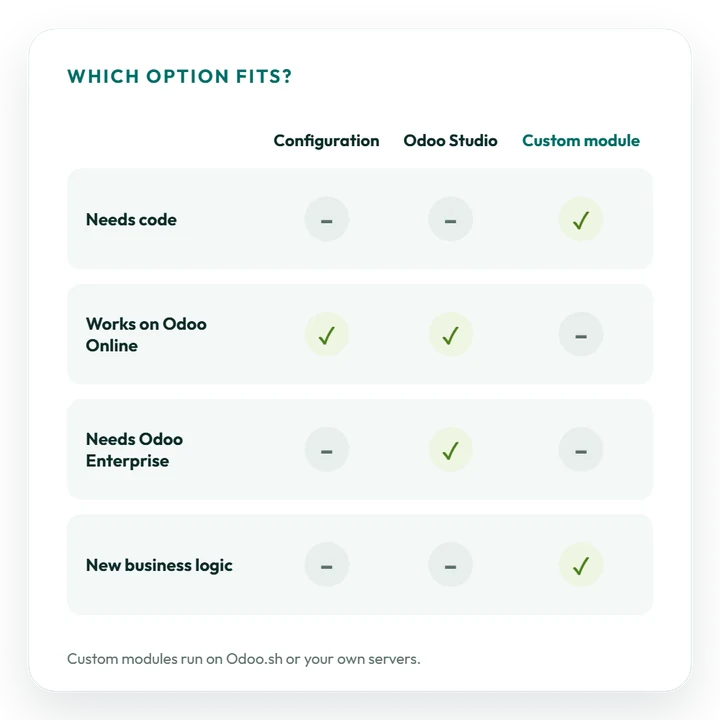
Odoo Studio covers many customizations without code; a custom module is needed when Odoo must do something new.
We recommend an approach for each change and explain the trade-offs in cost and upkeep.
Studio: fields and views
Add fields, reorder buttons and tabs, change list columns and Kanban stages, and hide what users do not need.
Studio: automation rules
Send emails, schedule activities, update records or, in Odoo 20, start activity plans when a condition is met.
Studio: PDF reports
Adjust quotation, invoice and delivery slip layouts in the report editor, with your branding and extra fields.
Studio: approval rules
Require a manager’s approval before an action, such as confirming an order, can run.
Code: new business logic
Complex calculations, new data models and changes to standard behaviour need a custom module.
Code: Community and integrations
Odoo Community does not include Studio, and integrations with other systems need code. See Odoo integration services.
Latest release
What Does Odoo 20 Add for Customization?
Odoo 20 was released in September 2026, and Studio can now do more without code. Highlights from the official release notes:
- Report editor: a new interface that warns when an element is shared across PDF reports, Many2many fields in PDF reports, and report translations in one block;
- Forms and lists: drag buttons, smart buttons and tabs to reorder them, customize Kanban stages from the form view, and set list column widths;
- Automation: automation rules can trigger activity plans, and automated actions can trigger AI agents and send Sign requests;
- Spreadsheets: print settings, pivot table styles and domain filters, default global filters and new chart types;
- Access rights: record rules are removed and a domain is set on each access right, so custom security needs reviewing when you upgrade.
Some features depend on your edition; see the official Odoo 20 release notes. Moving an older database to Odoo 20? Your customizations are checked and adjusted as part of the upgrade.
Odoo migration services →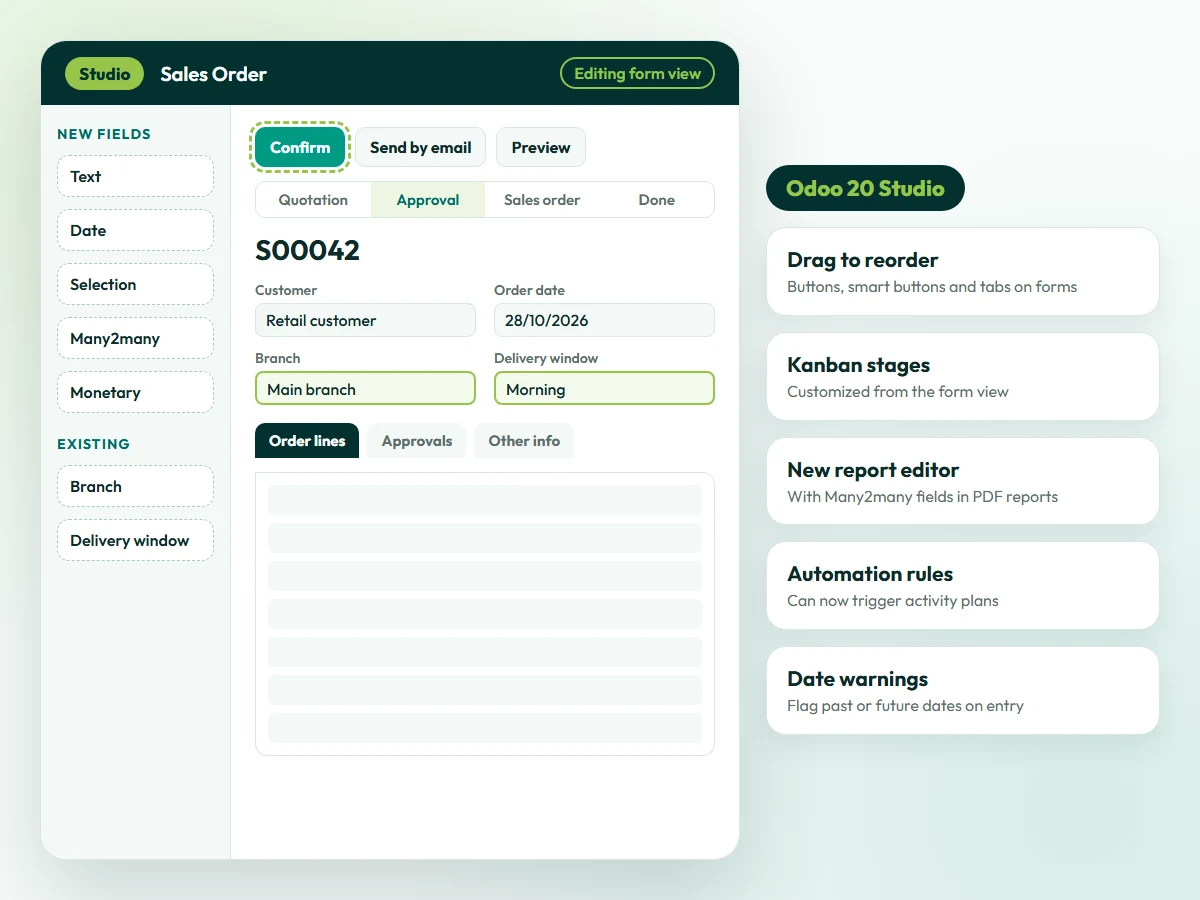
Illustration. Feature names come from the official Odoo 20 release notes.
Upgrade-safe
How We Keep Odoo Customizations Upgrade-Safe
Every customization has to keep working when Odoo changes. Four rules keep upgrades predictable.
Standard
Standard first
A change is made only when standard Odoo cannot meet the requirement, so there is less to maintain.
Simplest
Simplest tool
Configuration before Studio, and Studio before code, because each step adds upkeep.
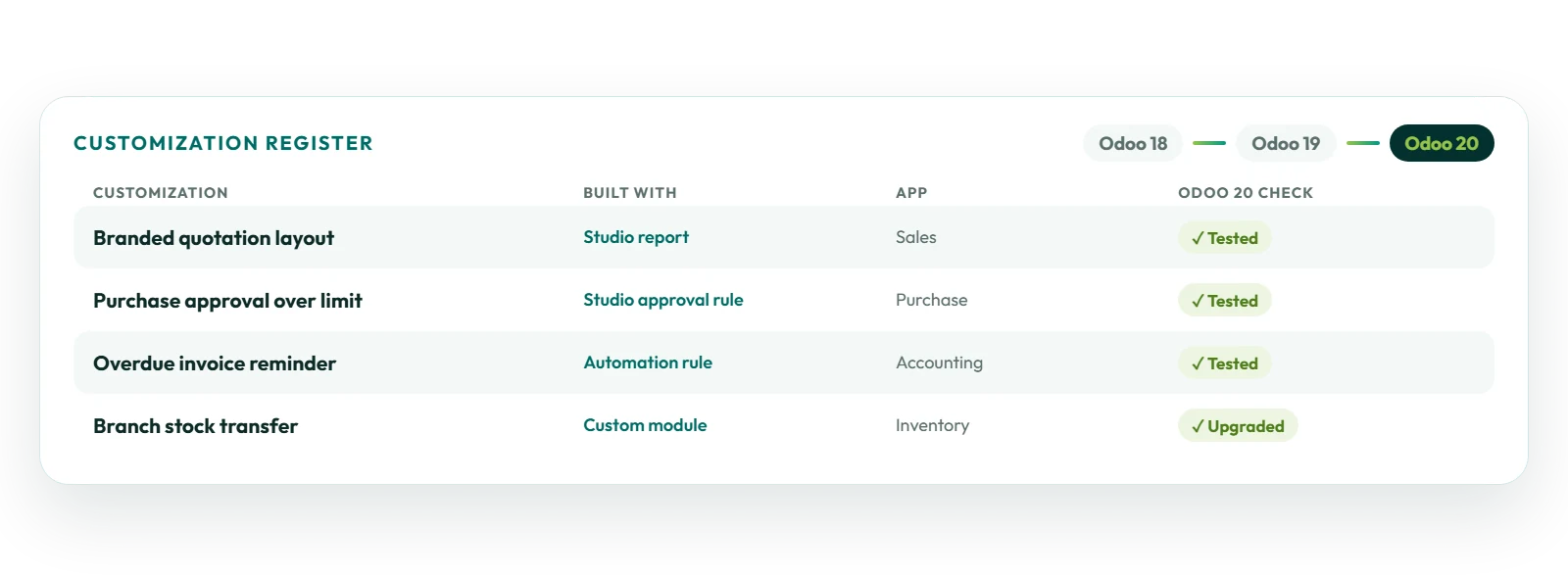
Register
One list of changes
Every customization is recorded with what it does, where it lives and who asked for it.
Upgrade
Tested at each upgrade
The list is checked on a copy of the upgraded database before you move to a new Odoo version.
Before you start
How Should You Prepare an Odoo Customization Request?
A clear list of changes gives you a more accurate estimate and a faster start.
Not sure what to change first? Our consultants can review your processes and recommend priorities.
Odoo consulting services →01
List the changes
Write down each change you need and why, and mark which are essential and which can wait.
02
Share examples
Add the forms, documents, spreadsheets or screenshots you use today, and the result you expect.
03
Name key users
Choose a key user in each department who can explain the process and test the changes.
04
Confirm version and hosting
Tell us your Odoo version, edition (Community or Enterprise) and hosting: Odoo Online, Odoo.sh or your own servers.
05
Agree what stays standard
Decide where your team can adopt Odoo’s standard way of working instead of changing it.
Timeline and cost
How Much Does Odoo Customization Cost?
It depends on scope. A new field, report layout or automation rule is usually a short piece of work; a package of workflow changes or a custom module takes longer and is often delivered in phases.
What affects cost and timeline
- the number of changes and the apps they touch;
- whether Studio is enough or code is needed;
- the number of reports and document layouts;
- your Odoo version, edition and hosting;
- the testing and training needed;
- how the changes will be maintained at future upgrades.
Odoo Enterprise subscriptions, which include Studio, are billed separately from customization work.
Request a customization estimate →Typical request sizes
These examples are indicative; your estimate confirms scope after the requirements step:
- Quick change: a new field, a list or form adjustment, or a branded report layout;
- Workflow package: approval steps, automation rules and a dashboard for one department;
- Larger customization: changes across several apps, including custom modules, delivered in phases.
You receive a written estimate before any work starts.
Case studies
Odoo Customization Projects We Have Delivered
Examples from different industries. See all case studies.
Retail
Retail inventory controls
How Match Perfumes got customized inventory workflows, advanced reports and multi-branch monitoring for its stores. Read the case study
Trading
Compliant invoicing
How Industrial Steel Solutions moved from manual bookkeeping to automated ZATCA e-invoicing in Odoo Accounting. Read the case study
Restaurants
Dashboards and purchasing
How Sweet & Salty got management dashboards and automated purchase requests on Odoo POS, Inventory and Accounting. Read the case study
IT services
Automated project billing
How DPSIT linked timesheets and milestones to invoicing, and made project billing 40% faster. Read the case study
Why OzonLayer
Why Choose OzonLayer for Odoo Customization?
Facts you can check before you speak to us.
01
Official Odoo Silver Partner
OzonLayer IT Services is listed as a Silver Partner in the Odoo partner directory, with customer references published on our partner page.
02
Studio and code in one team
Certified functional consultants handle configuration and Studio, and in-house developers build custom modules when code is needed.
03
One team from design to upgrade
The team that customizes your Odoo also tests, trains and reviews the changes at each upgrade, so knowledge is not lost.
04
International delivery
Offices in London, Riyadh and Pakistan, with projects for businesses in the UK, Saudi Arabia, the UAE and other markets.
Need a local team? See Odoo customization in the UK, Saudi Arabia or the UAE.
Related services
Related Odoo Services
FAQs
Odoo Customization: Frequently Asked Questions
Can’t find what you need? Our team replies to every enquiry with a straight answer on scope, timeline and budget.
Ask a customization expert
What are Odoo customization services?
Odoo customization services adapt Odoo ERP to the way a company works: fields and screens, reports and documents, workflows, approvals, automation rules, dashboards and access rights. OzonLayer uses standard configuration and Odoo Studio first, and builds custom modules where code is needed.
What is the difference between configuration, customization and development in Odoo?
Configuration uses the settings the standard apps already provide. Customization changes how Odoo looks and behaves for your users, often with Odoo Studio. Development builds new functionality in code, such as custom modules and integrations. Most projects use a mix of all three.
Can Odoo be customized without coding?
Yes. Odoo Studio, part of Odoo Enterprise, lets you add fields, change views, edit PDF reports, create automation rules and add approval rules without code. Changes that need new business logic, or databases on Odoo Community, need a custom module.
Can we customize Odoo Online?
Yes, with configuration and Odoo Studio. Odoo Online does not allow custom Python modules, so customizations that need code run on Odoo.sh or on your own servers.
Will customization affect future Odoo upgrades?
Every customization has to be checked when you upgrade. Configuration and Studio changes usually need less work than custom modules, which must be upgraded for each new version. Keeping a list of every customization and testing it on a copy of the upgraded database makes upgrades predictable.
How much does Odoo customization cost?
Cost depends on the number of changes, the apps they touch, whether Studio is enough or code is needed, and the reports, testing and training involved. You receive a written estimate after the requirements step. Odoo Enterprise subscriptions are billed separately.
How long does Odoo customization take?
A new field, report layout or automation rule is usually a short piece of work, while a package of workflow changes or a custom module takes longer and is often delivered in phases. We confirm the timeline in the estimate, including time for testing by your team.
Can you customize Odoo reports and invoices?
Yes. Quotations, invoices, delivery slips and other PDF documents can be changed in the Studio report editor or built as QWeb templates in a custom module. Odoo 20 adds a new report editor and lets you add Many2many fields to PDF reports.
Can you add approval steps to Odoo?
Yes. Studio approval rules can require a manager to approve an action, such as confirming an order, before it runs. Larger approval flows can use the Approvals app or a custom module, and Odoo 20 adds expense limits per job position.
What does Odoo 20 change for customization?
Odoo 20 adds a new Studio report editor, drag-and-drop ordering of buttons and tabs on forms, Kanban stage customization from the form view, list column widths and automation rules that trigger activity plans. Record rules are replaced by domains on access rights, so custom security should be reviewed when upgrading.
Do you customize Odoo Community and Odoo Enterprise?
Yes, both. Odoo Studio is part of Odoo Enterprise, so on Odoo Community the same changes are made in custom modules. We confirm your edition and hosting before recommending an approach.
Official Odoo Silver Partner
Make Odoo fit the way your company works
Tell us which screens, documents and workflows you want to change, and which Odoo version and hosting you use. We will review your list and send you a written estimate with the recommended approach.
Call UK +44 7477 204638 · KSA +966 56 434 5818 · Email info@ozonlayer.com