
Official Odoo Silver Partner
Odoo Training Services
Odoo training teaches each person in your business how to do their own job in Odoo: end users learn their daily tasks, key users learn to configure and adapt the system, and developers learn the Odoo framework. OzonLayer’s certified Odoo consultants run the training on your own processes and, where possible, on a copy of your own data.
As an official Odoo Silver Partner, we train teams on Odoo Community and Enterprise, online or on-site, for companies in the UK, Saudi Arabia and other markets.
Odoo 20
Training on the latest version
CE & EE
Community and Enterprise
Silver
Official Odoo partner
Scope
Who we train
- End users, by role
- Key users and administrators
- Studio, reports and automation
- Developers and IT teams
- Teams moving to Odoo 20
- Consultants preparing for certification
Every course is planned around your roles, apps and processes.
What we teach
What Do Odoo Training Services Include?
Odoo training services give every role the skills it needs to use Odoo with confidence, from first login to advanced configuration.
Users
Role-based end-user training
Sales, purchasing, warehouse, finance and HR teams learn the screens and steps for their own daily work, not every feature of every app.
Key users
Key-user and admin training
The people who run Odoo internally learn settings, users and access rights, so small changes no longer need outside help.
Studio
Studio, reports and automation
Fields, views, reports and automation rules built with Odoo Studio, and when a change needs customization instead.
Developers
Technical Odoo training
Module structure, models, views, security and the JSON-2 API for developers and IT teams. See Odoo development services.
Update
Odoo 20 update training
Teams moving to a new version learn only what changed for their role, as part of an Odoo upgrade.
Exam
Certification preparation
Consultants and key users prepare for Odoo’s official functional certification, app by app, with practice on real scenarios.
How we work
How Does Odoo Training Work?
Every training plan follows six steps, so each person learns what they need, practises it and can do it alone afterwards.
Training for a new implementation is scheduled just before go-live, so people use what they learn straight away.
Odoo implementation services →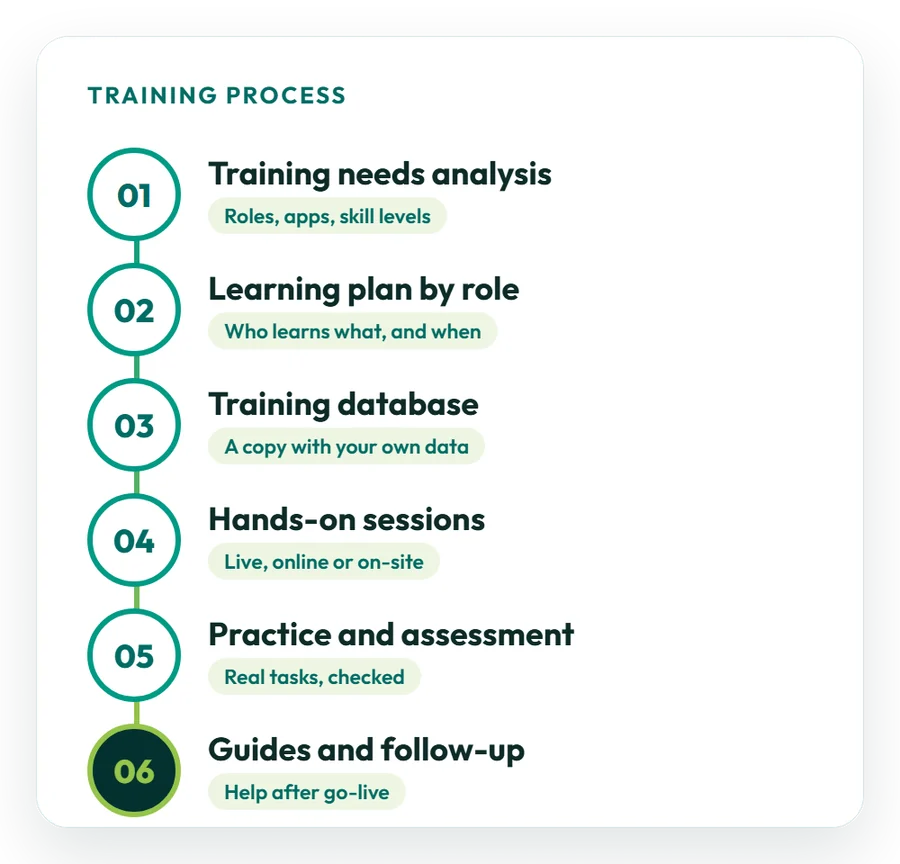
01
Training needs analysis
We list the roles, apps and current skill levels, and agree what each group must be able to do.
02
Learning plan by role
Each group gets its own sessions, in a logical order and at a pace that fits around daily work.
03
Training database
Where possible, sessions run on a copy of your Odoo with your own products, customers and settings.
04
Hands-on sessions
Short live sessions, online or on-site, where people do the tasks themselves rather than only watch.
05
Practice and assessment
Learners complete real tasks on their own, and we check the results and fill any gaps.
06
Guides and follow-up
Each role keeps short written guides, with help after go-live through Odoo support.
By role
What Should Each Team Learn in Odoo?
People learn faster when training follows their job, not the list of apps. A typical plan covers these groups:
The exact content depends on the apps you use and how Odoo is configured for your business.
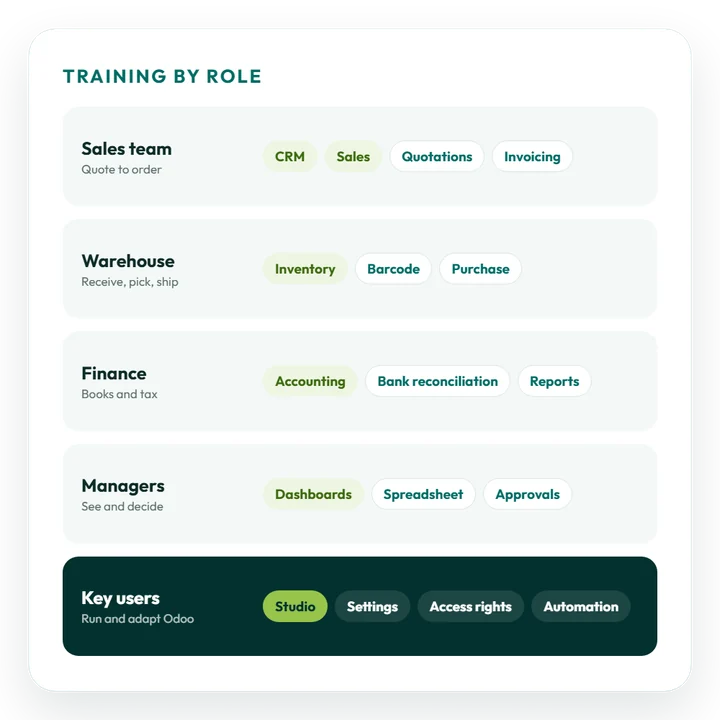
Sales and CRM
Leads and opportunities, quotations, orders and the steps from a confirmed sale to an invoice.
Purchasing and inventory
Requests for quotation, receipts, transfers, barcode scanning, stock counts and replenishment.
Accounting and finance
Invoices and bills, bank reconciliation, payments, tax reports and the month-end routine.
Manufacturing and projects
Bills of materials and work orders, or projects, tasks and timesheets, depending on your business.
Managers
Dashboards, reports, spreadsheets and approvals, so decisions are based on live data.
Key users
Settings, users and access rights, Studio changes and automation rules for the whole company.
Latest release
What Will Your Team Need to Learn in Odoo 20?
Odoo 20 was released in September 2026. Users notice some changes on day one, and key users get new tools they should learn to use well. From the official release notes:
- Studio: PDF reports can be edited in the Studio report editor, Many2many fields can be added to reports, and buttons and tabs can be reordered by drag and drop;
- Everyday screens: Kanban stages can be changed from the form view, and icons use Material Symbols;
- Offline mode: records can be created, edited and archived while offline;
- AI agents: agents can be started by automated and scheduled actions, and all AI features use IAP credits;
- Changed apps: field service is now part of Planning, and parent accounts replace account groups in Accounting.
Source: the official Odoo 20 release notes. Upgrading to Odoo 20? See Odoo migration services.
Odoo customization services →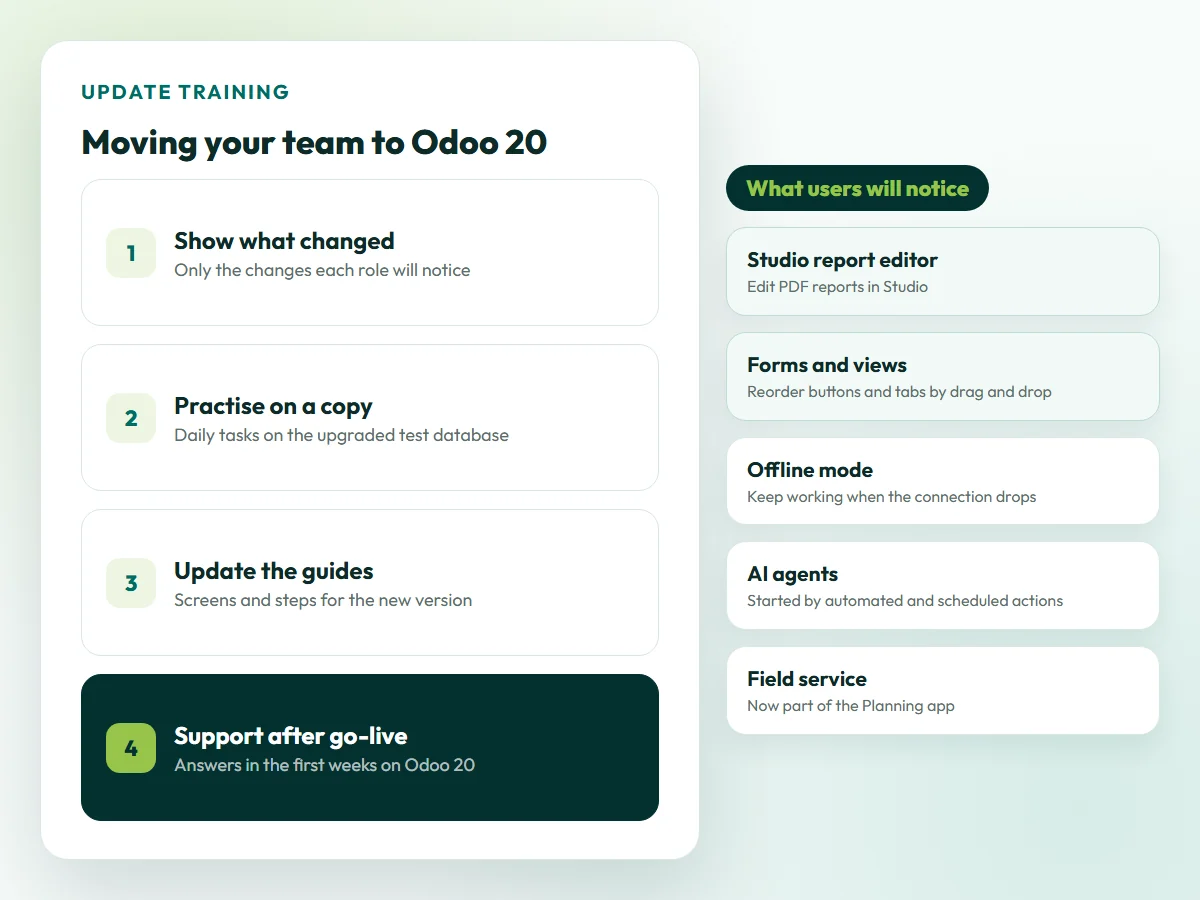
Illustration. The Odoo 20 changes come from the official release notes.
Training formats
Online, On-Site or Train-the-Trainer
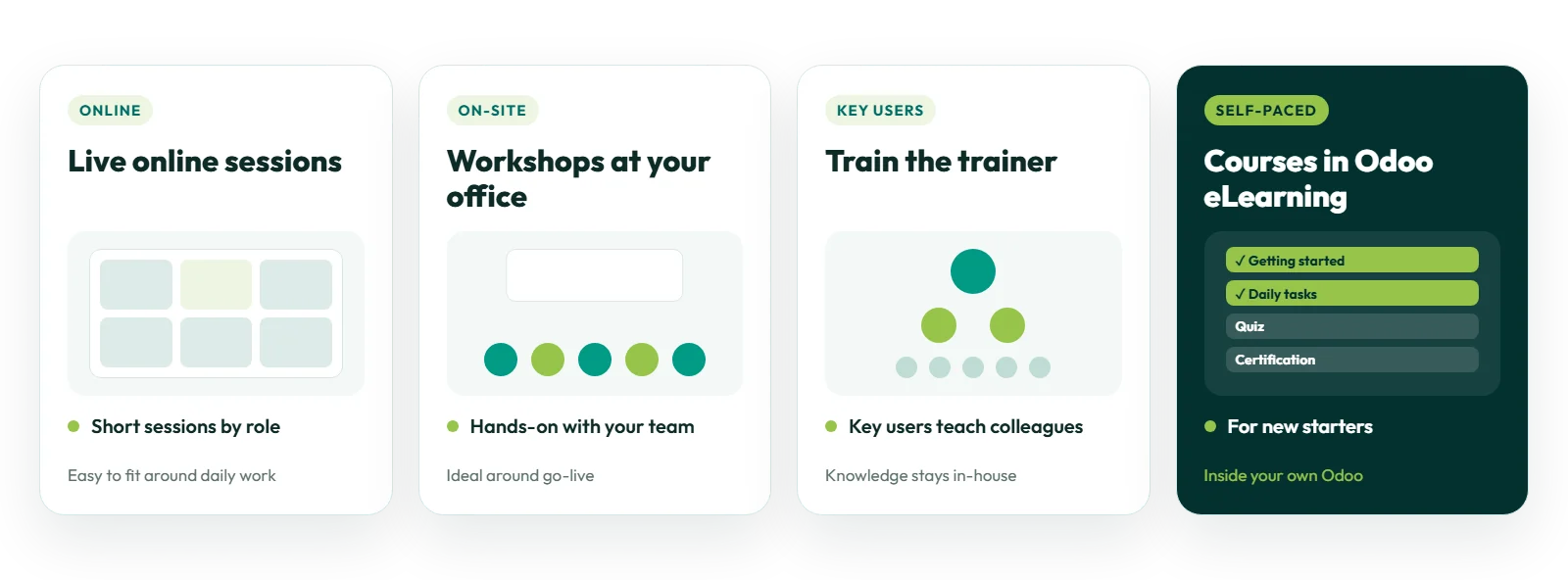
We combine formats to fit your team’s locations, schedules and the way people like to learn.
Online
Live online sessions
Short live sessions by role over video call, easy to fit around daily work and for teams in several locations.
On-site
Workshops at your office
Hands-on workshops with your team, arranged from our offices in London and Riyadh, often planned around go-live.
Key users
Train the trainer
We train your key users in depth so they can teach colleagues and new starters, keeping the knowledge in-house.
Self-paced
Courses in Odoo eLearning
Internal courses with documents, quizzes and certifications set up in Odoo’s own eLearning app for new starters.
Before you start
How Should You Prepare Your Team for Odoo Training?
A little preparation makes sessions shorter and helps people remember what they learn.
Odoo also publishes its own video tutorials and documentation. Our training connects them to the way your business uses Odoo.
Talk to a trainer →01
Name key users
Choose one person per team who will learn in more depth and help colleagues afterwards.
02
List roles and tasks
Write down who does what each day, so every session matches a real job.
03
Prepare a training copy
Agree a copy of your database for practice, so mistakes never touch live data.
04
Gather real examples
Collect typical orders, invoices and reports that learners can recreate in Odoo.
05
Protect the time
Plan sessions away from month-end and busy periods, so people can focus.
Timeline and cost
How Much Does Odoo Training Cost?
It depends on how many people and roles you need to train. A short course for one team is quick to plan; training a whole company before go-live takes more sessions.
What affects the cost of Odoo training
- the number of learners and roles;
- the Odoo apps and custom features covered;
- online, on-site or a mix of both;
- whether a training database with your data is prepared;
- written guides and self-paced courses;
- follow-up help after the sessions.
Training delivered as part of an implementation is planned and quoted together with the project.
Request a training proposal →Typical training plans
These examples are indicative; your proposal confirms the plan after a first call:
- Short course: one team or one app, such as Accounting or Inventory, in a few focused sessions;
- Go-live programme: training for every role before a new Odoo system goes live, with guides;
- Update and refresher training: what changed in a new version, or a refresher for teams and new starters.
You receive a written proposal before any training starts.
Case studies
Businesses Running on Odoo with Our Team
Examples from different industries. See all case studies.
Retail
Custom workflows and integrations
How Match Perfumes runs customized inventory workflows and reports, with Odoo connected to Salla and Salesforce. Read the case study
Trading
From spreadsheets to Odoo
How Industrial Steel Solutions moved from spreadsheets to Odoo Accounting with ZATCA Phase 2 e-invoicing. Read the case study
Restaurants
From manual tills
How Sweet & Salty replaced manual tills with Odoo POS, automated purchase requests and dashboards. Read the case study
IT services
Faster billing
How DPSIT linked timesheets and milestones to invoicing in Odoo and made billing 40% faster. Read the case study
Why OzonLayer
Why Choose OzonLayer for Odoo Training?
Facts you can check before you speak to us.
01
Official Odoo Silver Partner
OzonLayer IT Services is listed as a Silver Partner in the Odoo partner directory, with customer references published on our partner page.
02
Trainers who implement Odoo
Training is given by certified functional consultants and developers who configure and build Odoo systems every day.
03
Training linked to your project
When we implement or support your Odoo, training uses the same configuration, so what people learn is what they use.
04
International delivery
Offices in London, Riyadh and Pakistan, with training for businesses in the UK, Saudi Arabia, the UAE and other markets.
Need a local team? See Odoo training in the UK, Saudi Arabia or the UAE.
Related services
Related Odoo Services
FAQs
Odoo Training: Frequently Asked Questions
Can’t find what you need? Our team replies to every enquiry with a straight answer on scope, timeline and budget.
Ask a trainer
What are Odoo training services?
Odoo training services teach the people in a business how to use Odoo for their own work. They cover role-based training for end users, deeper training for key users and administrators, technical training for developers, and update training when moving to a new Odoo version.
What types of Odoo training do you offer?
We offer end-user training by role, key-user and administrator training, Studio, reports and automation training, technical training for developers, Odoo 20 update training and preparation for the Odoo functional certification.
Is Odoo training online or on-site?
Both. Most sessions run live online, and on-site workshops can be arranged from our offices in London and Riyadh. Many companies combine the two, with on-site sessions around go-live.
Can you train our team on our own data?
Yes. Where possible, we prepare a copy of your Odoo database with your own products, customers and settings, so people practise real tasks without any risk to live data.
Do you offer Odoo training for beginners?
Yes. Training for new users starts with navigation and the basic screens, then moves to the tasks each person does every day. No previous Odoo knowledge is needed.
Do you offer technical Odoo training for developers?
Yes. Technical training covers module structure, models, views, security, reports and the JSON-2 API, which Odoo 20 recommends for integrations instead of the deprecated XML-RPC and JSON-RPC API.
What changes in Odoo 20 do users need training on?
According to the Odoo 20 release notes, users will notice the Studio report editor, drag-and-drop reordering of buttons and tabs, offline mode, AI agents that run on IAP credits, field service inside the Planning app and parent accounts in Accounting.
Does Odoo offer its own training?
Yes. Odoo publishes video tutorials on its eLearning site and full documentation, including developer tutorials. Partner training adds sessions built around your own configuration, roles and data.
What is the Odoo functional certification?
It is Odoo's official exam for functional knowledge of a specific Odoo version, taken on Odoo's eLearning platform. The certification is nominative, meaning it belongs to the person who takes it. We help consultants and key users prepare.
How much does Odoo training cost?
Cost depends on the number of learners and roles, the apps covered, online or on-site delivery, whether a training database is prepared, and the guides and follow-up you need. You receive a written proposal first.
Can you set up internal training courses in Odoo?
Yes. Odoo's eLearning app lets you build courses with documents and quizzes, and add certifications through the Surveys app. We can set up courses so new starters learn your processes inside your own Odoo.
Official Odoo Silver Partner
Help your team get the most from Odoo
Tell us which Odoo apps you use, who needs training and when. We will suggest a training plan by role and send you a written proposal.
Call UK +44 7477 204638 · KSA +966 56 434 5818 · Email info@ozonlayer.com