
Official Odoo Silver Partner
Odoo Development Services
Odoo development is the work of building new features for Odoo ERP in code: custom modules, integrations, reports and automations that standard Odoo and Odoo Studio cannot provide. OzonLayer’s in-house Odoo developers design, build, test and maintain that code for you.
As an official Odoo Silver Partner, we develop for Odoo Community and Enterprise, on Odoo.sh or your own servers, for companies in the UK, Saudi Arabia and other markets. Every request starts with a check of what standard Odoo already does.
Python & OWL
Odoo’s own framework
CE & EE
Community and Enterprise
Silver
Official Odoo partner
Scope
What we build
- Custom Odoo modules and apps
- Integrations through the External JSON-2 API
- PDF reports, dashboards and documents
- Website, eCommerce and portal features
- Automated workflows and scheduled jobs
- Upgrades of custom modules to new Odoo versions
Custom code runs on Odoo.sh or your own servers, not on Odoo Online.
What we build
What Do Odoo Development Services Include?
Odoo development services add what standard Odoo does not do, without changing Odoo’s own code. Most requests fall into six areas.
Modules
Custom module development
New models, screens, business rules and access rights, packaged as Odoo modules and built for your Odoo version and edition.
Connect
Integrations and APIs
Two-way connections with online stores, payment providers, carriers, banks and tax portals through the External JSON-2 API, webhooks or connectors. See Odoo integration services.
Report
Reports and dashboards
Custom PDF documents such as invoices, delivery slips and certificates, built as QWeb reports, plus dashboards on live Odoo data.
Web
Website, eCommerce and portal
Website themes, eCommerce features and customer or supplier portal pages, built with Odoo’s website framework and OWL components.
Automate
Automation
Automated and scheduled actions, approval flows and server actions that remove repetitive manual steps.
Upgrade
Module upgrades
Existing custom modules are reviewed, ported and tested for each new Odoo version, including Odoo 20. See Odoo migration services.
How we work
How Does an Odoo Development Project Work?
Every request follows six steps, so no code reaches your live database until it has been tested.
Small enhancements move through the steps quickly; larger modules are split into phases that you can test one by one.
Odoo customization services →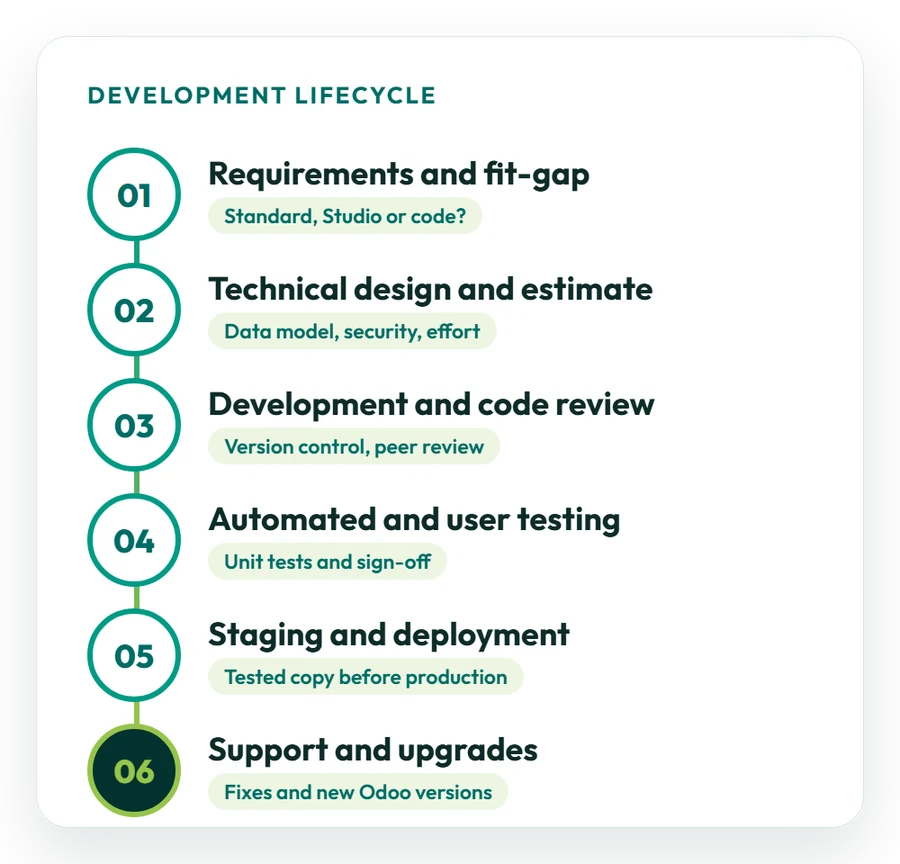
01
Requirements and fit-gap
We document the requirement with examples and check whether standard Odoo, configuration or Odoo Studio already covers it before any code is written.
02
Technical design and estimate
The data model, screens, access rights and integration points are designed, and you receive a written estimate.
03
Development and code review
Developers build the module in version control, and changes are reviewed before they are merged.
04
Automated and user testing
Automated tests check the business rules, and your key users test each feature on a copy of your database before sign-off.
05
Staging and deployment
Approved modules go to a staging copy first, then to production on Odoo.sh or your own servers at a time agreed with you.
06
Support and upgrades
We fix issues after release and keep your modules working with new Odoo versions through Odoo support.
Choosing the approach
Configuration, Odoo Studio or Custom Code: Which Do You Need?
Use the simplest option that meets the requirement, because every line of custom code has to be maintained and upgraded.
We recommend an approach for each requirement during the fit-gap step and explain the trade-offs in cost and upkeep.
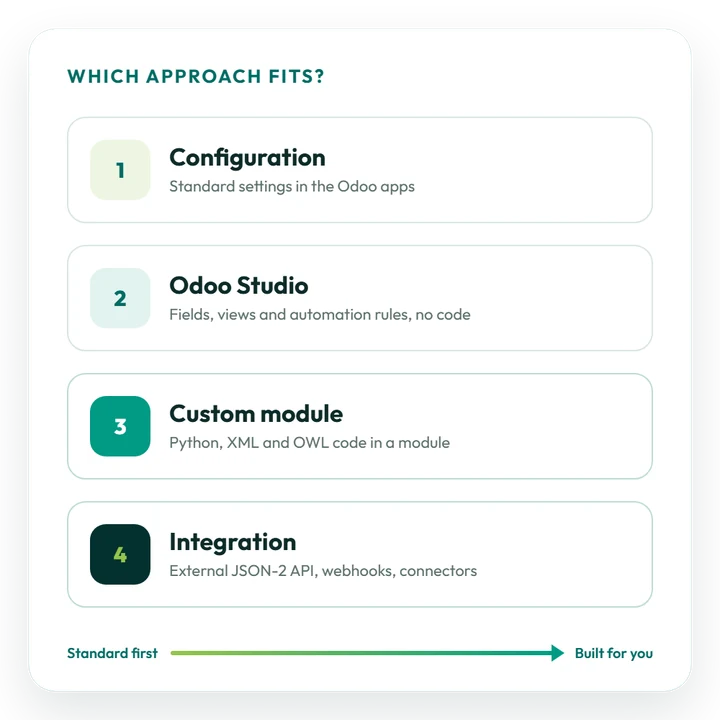
Configuration
Settings, workflows, taxes, reports and access rights that the standard Odoo apps already provide. No code, and nothing extra to upgrade.
Odoo Studio
Part of Odoo Enterprise: add fields, change views and create automation rules without code. Good for simple changes your own team can make.
Custom module
Needed for new business logic, complex calculations, new data models or interface changes. Runs on Odoo.sh or your own servers, not on Odoo Online.
Integration
Needed when data must flow between Odoo and another system. New integrations use the External JSON-2 API.
Custom report
Needed when a document must follow a fixed layout, such as a branded invoice, a delivery slip or a regulatory form.
Automation
Automated and scheduled actions, from rules set up in the interface to Python code in a module.
Latest release
What Does Odoo 20 Change for Odoo Development?
Odoo 20 was released in September 2026. New modules can be built for it directly, and existing custom modules need checking before an upgrade. Changes from the official release notes and developer documentation:
- Simpler access rights: record rules are removed and a domain is now set directly on each access right, so the security of custom modules must be reviewed when upgrading;
- External API: the XML-RPC and JSON-RPC API has been deprecated since Odoo 19; its database service was removed in Odoo 20 and its other services are scheduled for removal in Odoo 22. The External JSON-2 API replaces it;
- AI agents and MCP: automated and scheduled actions can trigger AI agents, and the database can be connected to other tools through the Model Context Protocol; AI features use Odoo IAP credits;
- Offline mode: records can be created, edited and deleted without a connection;
- Interface: Material Symbols replace Font Awesome icons, so custom views that use icons need checking.
Sources: the official Odoo 20 release notes and the External RPC API documentation. Moving an older database to Odoo 20? Your custom modules are upgraded and tested as part of the migration.
Odoo migration services →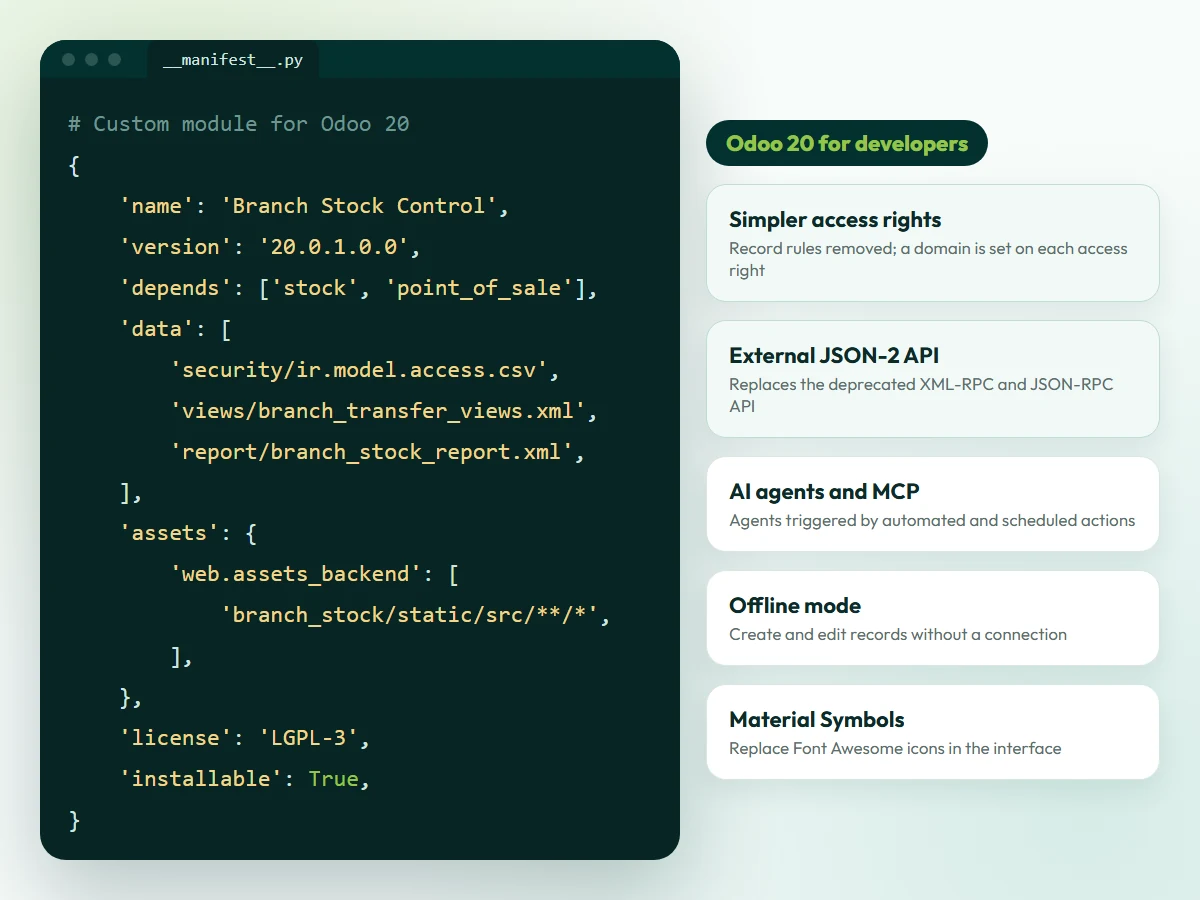
Illustration. The module shown is an example; the changes listed come from the official Odoo 20 release notes and documentation.
Code quality
How We Build Odoo Modules That Stay Upgradeable
Custom code is only an asset if it can be maintained. Four practices keep your modules working through new Odoo versions.
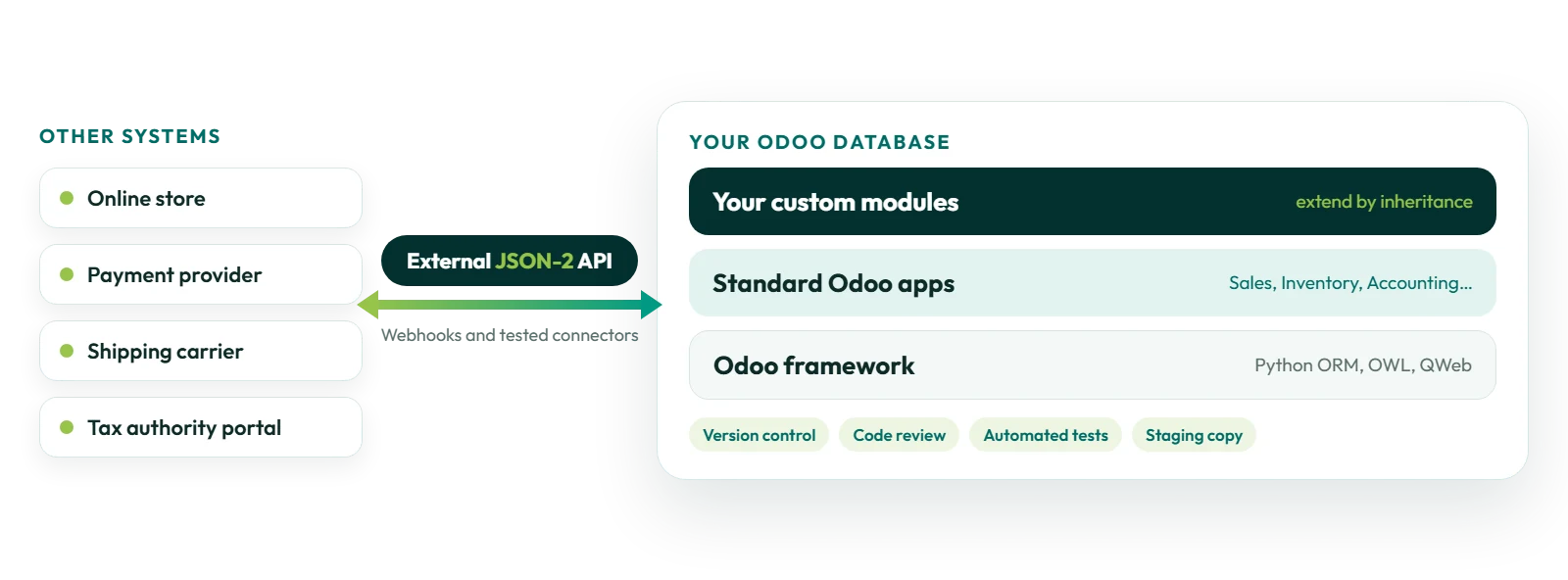
Inherit
Extend, never edit core
Modules extend Odoo’s standard models and views through inheritance instead of changing Odoo’s own code, so standard updates still apply.
Review
Version control and review
Code is kept in a Git repository with its full history, and changes are reviewed before they reach your database.
Test
Automated tests
Unit tests cover the business rules of each module, so problems show up when Odoo or the module changes, before your users see them.
Document
Documentation and handover
Modules are documented so that your team, or any Odoo partner, can understand, configure and maintain them.
Before you start
How Should You Prepare an Odoo Development Request?
A clear request gives you a more accurate estimate and a faster start.
Not sure whether you need development at all? Our consultants can review the requirement first.
Odoo consulting services →01
Describe the problem
Explain the business process and what does not work today, not only the feature you have in mind.
02
Share examples
Add sample documents, spreadsheets, screenshots or report layouts that show the expected result.
03
List the systems involved
For integrations, name the other application and share its API documentation and test (sandbox) access.
04
Confirm version and hosting
Tell us your Odoo version, edition (Community or Enterprise) and hosting: Odoo Online, Odoo.sh or your own servers.
05
Name an owner
Choose one person who answers questions, tests the result and signs it off.
Timeline and cost
How Much Does Custom Odoo Development Cost?
It depends on scope. A small enhancement such as a new field, report or automation is usually a short piece of work; a new module or a two-way integration takes longer and is often delivered in phases.
What affects cost and timeline
- the complexity of the business rules and data model;
- the number of screens, reports and documents;
- the integrations and the quality of the other system’s API;
- your Odoo version, edition and hosting;
- the testing and data preparation needed;
- future upgrades of the module to new Odoo versions.
Odoo Enterprise subscriptions are billed separately from development work. When you plan a move to a new Odoo version, include the upgrade of your custom modules in the budget.
Request a development estimate →Typical request sizes
These examples are indicative; your estimate confirms scope after the requirements step:
- Small enhancement: a new field, report layout or automated action in an existing app;
- Custom module: new screens and business rules for one process, such as branch transfers or an approval flow;
- Integration or larger module: a two-way connection with another system, or a module that touches several apps, delivered in phases.
You receive a written estimate before any work starts.
Case studies
Odoo Development and Integration Work We Have Delivered
Examples from different industries. See all case studies.
Retail
Custom modules and APIs
How Match Perfumes got retail-specific inventory controls and reports, plus direct REST API integrations with Salla and Salesforce. Read the case study
E-invoicing
ZATCA Phase 2 integration
How Industrial Steel Solutions connected Odoo Accounting to ZATCA for automated e-invoice clearance and reporting. Read the case study
Restaurants
Dashboards and automation
How Sweet & Salty got management dashboards and automated purchase requests on Odoo POS, Inventory and Accounting. Read the case study
IT services
Automated project billing
How DPSIT linked timesheets and milestones to invoicing, and made project billing 40% faster. Read the case study
Why OzonLayer
Why Choose OzonLayer for Odoo Development?
Facts you can check before you speak to us.
01
Official Odoo Silver Partner
OzonLayer IT Services is listed as a Silver Partner in the Odoo partner directory, with customer references published on our partner page.
02
Consultants and developers together
Certified functional consultants check each requirement against standard Odoo, and in-house developers build and maintain the code.
03
One team from design to upgrade
The team that builds your modules also tests, deploys and upgrades them, so knowledge is not lost between projects.
04
International delivery
Offices in London, Riyadh and Pakistan, with projects for businesses in the UK, Saudi Arabia, the UAE and other markets.
Need a local team? See Odoo development in the UK, Saudi Arabia or the UAE.
Related services
Related Odoo Services
FAQs
Odoo Development: Frequently Asked Questions
Can’t find what you need? Our team replies to every enquiry with a straight answer on scope, timeline and budget.
Ask an Odoo developer
What are Odoo development services?
Odoo development services cover building new functionality for Odoo ERP in code: custom modules, integrations with other systems, reports, website and portal features, automations, and upgrades of existing custom modules. OzonLayer's in-house developers design, build, test and maintain this code.
What is the difference between Odoo customization and Odoo development?
Customization adapts what Odoo already has, such as settings, fields, views, workflows and reports, often without code or with Odoo Studio. Development builds what Odoo does not have yet, in code: new modules, business logic, integrations and interface components. Many projects need a mix of both.
When do we need custom development instead of Odoo Studio?
Odoo Studio, part of Odoo Enterprise, handles new fields, view changes and simple automation rules without code. Custom development is needed for complex business logic, new data models, integrations, advanced reports or interface changes, and for anything on Odoo Community, which does not include Studio.
Can custom modules run on Odoo Online?
No. Odoo Online does not allow custom Python modules. Databases that need custom modules run on Odoo.sh or on your own servers, and an Odoo Online database can be moved there.
Which Odoo version do you develop for?
New modules are built for Odoo 20, released in September 2026, or for the version your database runs today. If you plan to upgrade soon, building for the target version avoids porting the code twice.
How much does custom Odoo development cost?
Cost depends on the complexity of the business rules, the number of screens and reports, the integrations involved, and your Odoo version and hosting. You receive a written estimate after the requirements step. Odoo Enterprise subscriptions are billed separately.
How long does it take to develop a custom Odoo module?
A small enhancement is usually a short piece of work, while a new module or a two-way integration takes longer and is often delivered in phases. We confirm the timeline in the estimate, including time for testing by your team.
Can you upgrade our existing custom modules to a new Odoo version?
Yes. We review each module, port the code to the new version, adapt it to framework changes such as Odoo 20's new access rights, and test it on a copy of your upgraded database before go-live. Modules written by other developers can be reviewed too.
How do you integrate Odoo with other systems?
New integrations use Odoo's External JSON-2 API, webhooks or existing connectors. The older XML-RPC and JSON-RPC API has been deprecated since Odoo 19 and is being removed in stages, so integrations built on it should be planned for migration. Every integration is tested before go-live.
Will custom development make future Odoo upgrades harder?
Every custom module has to be upgraded with each new Odoo version, so it adds some work to upgrades. Modules that extend Odoo through inheritance, without changing Odoo's own code, and that have automated tests are much easier to upgrade.
Do you develop for Odoo Community and Odoo Enterprise?
Yes, both. Some features, such as Odoo Studio and several apps, exist only in Odoo Enterprise, so we confirm your edition and hosting before designing a module.
Official Odoo Silver Partner
Discuss your Odoo development project with our team
Tell us what you need Odoo to do, which version and hosting you use, and which systems are involved. We will review the requirement and send you a written estimate with the recommended approach.
Call UK +44 7477 204638 · KSA +966 56 434 5818 · Email info@ozonlayer.com