Official Odoo Silver Partner
Odoo Implementation Services in Pakistan
Implementing Odoo means planning, setting up and launching the ERP so it handles the way your company actually works. In Pakistan that means PKR books, 18% FBR sales tax, provincial sales tax on services, withholding tax and FBR digital invoicing built in from the first day, plus payroll where you need it.
As an official Odoo Silver Partner with certified consultants, OzonLayer sets up Odoo Community and Enterprise for Pakistani manufacturers, distributors, retailers, traders and service firms. Each project is run by the consultants and developers in our Pakistan office, on PKT hours.
PKR
Pakistan chart of accounts and taxes
UR / EN
Workshops in Urdu or English
Silver
Official Odoo partner
Scope
What every project covers
- Process review and fit-gap
- Pakistan set-up: PKR, sales tax and withholding
- Configuring the Odoo apps in scope
- Data import and integrations
- FBR digital invoicing connection
- Training, launch and aftercare
Hosted on Odoo Online, Odoo.sh or your own server.
Our services
What Is Included in Odoo Implementation Services in Pakistan?
In Pakistan, implementation shapes Odoo’s standard apps into one working system that already applies FBR and provincial tax rules. The work falls into six parts.
Analyse
Fit-gap review of how you work
Our consultants map how quotations, sales tax invoices, stock and approvals run in your business now, then mark each need as standard Odoo, set-up work or new development.
Configure
Set-up on the Pakistan localisation
Companies, users, products, workflows and reports go onto the Pakistan chart of accounts, with 18% sales tax, provincial service taxes and withholding taxes ready for daily use.
Extend
Custom modules for the gaps
If Studio cannot do it, for example FBR QR codes on invoices in Odoo 17 to 19, our developers build a module. Read about Odoo customisation work.
Migrate
Moving your data
Customer and supplier records, items, unpaid invoices and opening balances are brought across from your old accounting software or ERP, and sales tax balances are agreed. Read about Odoo migration in Pakistan.
Connect
Linked systems
Odoo is joined to your online store, payment gateways, couriers and FBR’s digital invoicing service. Read about Odoo integrations.
Launch
Training and go-live
Staff learn the exact screens their jobs need, in Urdu or English, and we remain on hand during launch and the first weeks after it. Read about Odoo training for users.
Our method
What Are the Stages of an Odoo Implementation in Pakistan?
Six steps, and nothing is switched on until your staff have tested it on real records.
Workshops, reviews and training are held online by our Pakistan team in Urdu or English, with on-site visits by arrangement; you approve a written plan before work starts.
Talk to an Odoo consultant →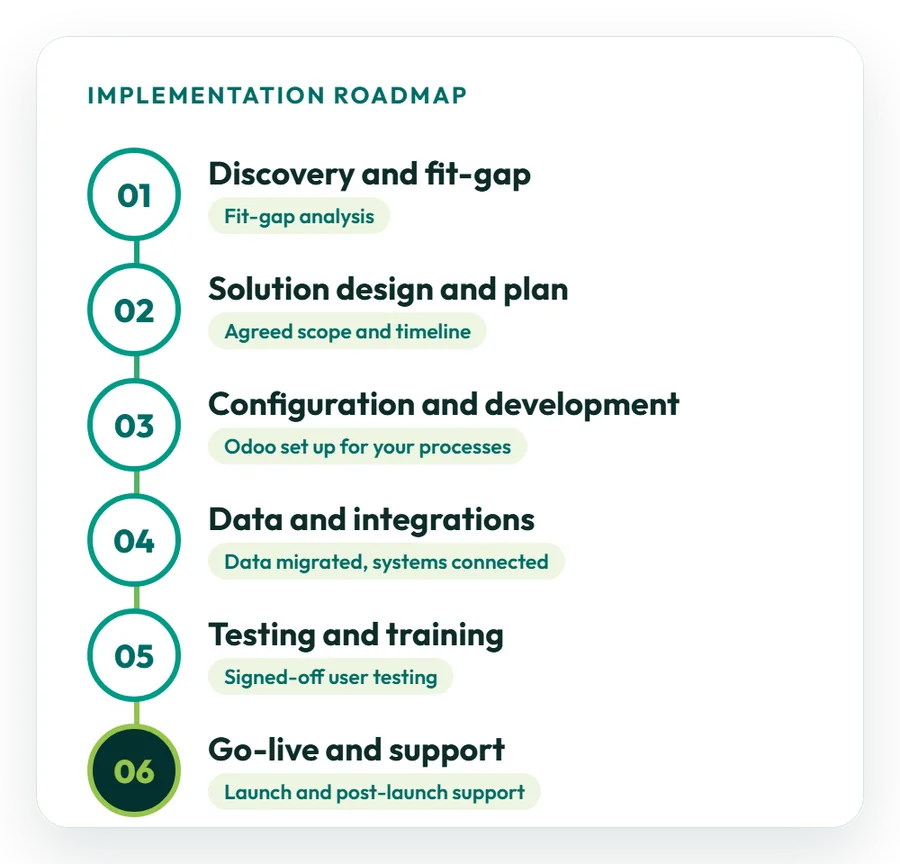
01
Discovery and fit-gap
We look at your processes, current software and goals, including sales tax and withholding reporting, and decide which needs standard Odoo meets and which need set-up or code.
02
Design and project plan
You approve scope, design, dates and responsibilities in writing, including which companies and provincial tax registrations are in scope, before configuration begins.
03
Set-up and development
The apps in scope are configured, including the Pakistan chart of accounts and sales and withholding taxes, any modules are built, and key users review each step.
04
Data and integrations
Customer and supplier records with NTN or CNIC numbers, items and PKR opening balances are checked, loaded and agreed, and your other software is connected.
05
Testing and training
On a test database with real records, key users work through every process (user acceptance testing), including a practice sales tax return, and each person is trained for their role.
06
Go-live and aftercare
We run the switch-over, timed away from the monthly sales tax dates, and the first weeks on Odoo, then pass you to Odoo support after launch.
Odoo apps
Which Odoo Apps Should a Pakistani Company Start With?
Start with the apps that run your main processes, then add others in later phases.
The fit-gap work shows what the standard apps and the Pakistan localisation handle on their own. Some apps and features, including Payroll, are part of Odoo Enterprise only.
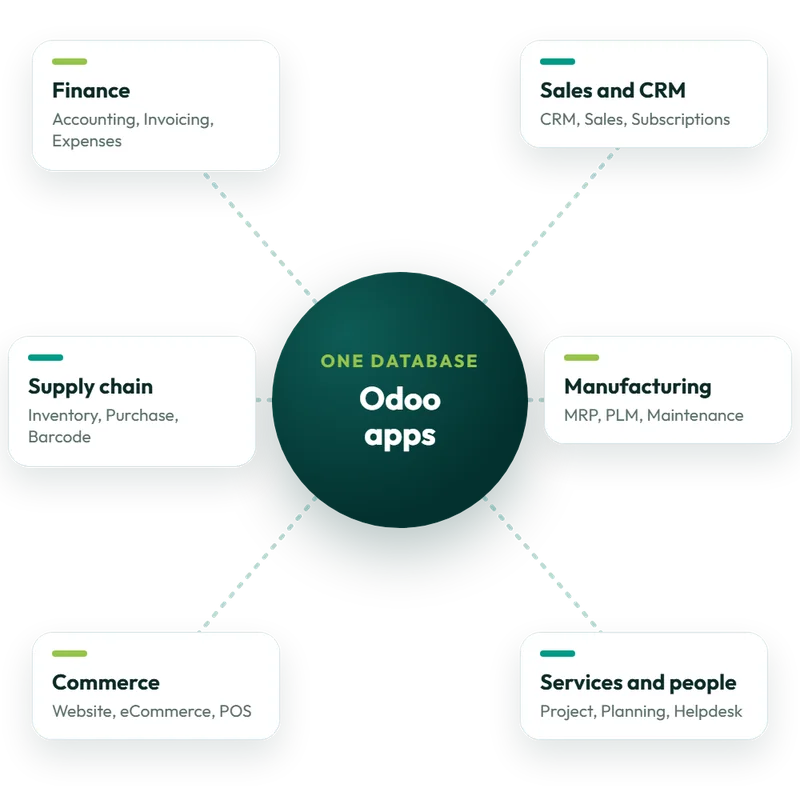
Finance
Accounting, Invoicing and Expenses on the Pakistan chart of accounts, with sales tax, withholding tax, bank reconciliation and management reports.
Sales and CRM
CRM, Sales, Subscriptions and Email Marketing cover the path from first lead to settled invoice, in PKR or another currency.
Supply chain
Inventory, Purchase, Barcode and Quality handle stock, local and imported purchases, and work in the warehouse.
Manufacturing
Manufacturing, PLM and Maintenance plan production, keep bills of materials and work orders, and track machine servicing.
Commerce
Website, eCommerce and Point of Sale share one stock figure and customer list across online and shop sales, with FBR POS reporting on Odoo 20.
Services and people
Project, Timesheets, Planning (field service included), Helpdesk, Employees and Payroll; for Pakistan we set up salary tax, EOBI and provincial social security contributions.
FBR digital invoicing
How Does Odoo Handle FBR Digital Invoicing in Pakistan?
Digital invoicing is mandatory for sales-tax-registered businesses, so it belongs in your go-live scope. Accurate NTNs, tax codes and product data in Odoo make the FBR link far easier. What applies now:
- SRO 69(I)/2025: rewrote Chapter XIV of the Sales Tax Rules in January 2025;
- SRO 709(I)/2025: extended e-invoicing to all corporate and non-corporate registered persons;
- SRO 1852(I)/2025: phased timetable, starting with large companies, public companies and importers; all phases have now passed;
- Tier-1 retailers: POS receipts carry the FBR invoice number and a QR code the customer can verify;
- How it works: Odoo sends each invoice in real time to the PRAL DI API through an FBR-licensed integrator, and FBR returns a unique invoice number that is printed with a QR code.
Sources: EY’s alert on SRO 709 and FBR’s technical documentation for the DI API. FBR has changed these rules several times, so confirm the current position with FBR before planning.
Odoo integration in Pakistan →Pakistan localisation
How Does Odoo Handle Pakistan Tax and Payroll?
Odoo provides a Pakistan accounting localisation, and Odoo 20 adds FBR features. We activate and configure it as part of the project, so your finance and HR teams begin with correct settings.
Sales tax
Sales tax and the IRIS return
The Pakistan localisation brings sales taxes and a tax report, and Odoo 20 adds the 18% Third Schedule (MRP) tax. The report supplies the figures for the monthly return you file on IRIS. See the Odoo 20 release notes.
Withholding
Withholding tax reporting
A withholding tax report comes with the localisation. Rates differ for goods, services and contracts, and for payees off the Active Taxpayer List, so we set them up with your accountant.
Payroll
Pakistan payroll and EOBI
Pakistan is on Odoo’s payroll localisation list, and Odoo 20 adds year-end income tax adjustments on payslips. We configure salary tax, EOBI and provincial social security contributions. See the payroll localisation list.
Currency
PKR, Urdu and English
PKR as the base currency with the Rs symbol before the amount, automatic rates for imports in other currencies, English tax documents, and training in Urdu or English.
Getting ready
How Should a Pakistani Business Prepare for Odoo Implementation?
Teams that prepare go live faster and with fewer surprises.
Discovery covers every point below with you. Comparing proposals from several Odoo partners? Use our guide to check them side by side.
How to compare Odoo partner quotes →01
Write down current processes
Explain how quotes, buying, stock, invoicing and sales tax filing work now, with exceptions and manual fixes.
02
Name a project owner
Choose one decision-maker with authority, plus a key user in each department who tests and signs off processes.
03
Clean your master data
Remove duplicate customers, suppliers and items, archive old records and confirm NTNs and STRNs before import.
04
Agree phases and scope
Decide what must run on day one, FBR digital invoicing included if you are registered, and what can follow later.
05
Pick a go-live date
Stay clear of month-end, the monthly sales tax dates, the 30 June year-end and your busiest season.
Time and cost
How Long Does Odoo Implementation Take in Pakistan, and How Much Does It Cost?
Both depend on scope. A company using a few standard apps can often go live within weeks, while groups with several companies or provincial tax registrations, custom modules and integrations usually take a few months.
What drives cost and timing
- the number of users, companies and provincial tax registrations;
- the Odoo apps in scope, such as Payroll or Point of Sale;
- the amount of customisation;
- integrations, including FBR digital invoicing;
- the volume and quality of data to migrate;
- how much training and aftercare you want.
Odoo bills subscriptions directly: first-year Pakistan prices are US$7.25 (Standard) or US$13.40 (Custom) per user a month, billed yearly. Our fee is separate.
Request a priced proposal →Typical project shapes
A guide only; after discovery your proposal fixes the real scope and dates:
- Quick start: a few core apps on the Pakistan localisation with light customisation and simple data, frequently live within weeks;
- Phased roll-out: one department at a time moves to Odoo, with some custom work, usually over a few months;
- Larger programme: several companies, possibly across countries, with many integrations and modules, delivered in phases over several months.
Work starts only after you approve a scoped proposal.
Case studies
Odoo Projects We Have Implemented
All our published case studies are Saudi projects. The work in them, multi-branch retail, e-invoicing, restaurant POS and project billing, matches what Pakistani companies need from Odoo. Browse every case study.
Retail
Multi-branch retail
A Saudi project: Match Perfumes ran stock, sales, buying and finance for all its branches in Odoo. Read the retail case study
Trading
Automated e-invoicing
A Saudi project: Industrial Steel Solutions replaced manual books with automated ZATCA e-invoicing, work similar to FBR digital invoicing. Read the e-invoicing case study
Restaurants
Odoo POS
A Saudi project: Sweet & Salty connected sales, ingredients, buying and accounts in Odoo and cut food waste by 30%. Read the restaurant case study
IT services
Project billing
A Saudi project: DPSIT brought sales, projects, timesheets and accounts together in Odoo, and project billing became 40% faster. Read the IT services case study
Why OzonLayer
Why Choose OzonLayer for Odoo Implementation in Pakistan?
Points you can verify before contacting us.
01
Official Odoo Silver Partner
OzonLayer IT Services is listed as a Silver Partner on Odoo’s own partner directory, together with our published client references.
02
Certified Odoo consultants
Our Odoo 18 certified functional consultants handle analysis and configuration, and our in-house developers build custom modules and integrations.
03
The same team from start to finish
Whoever maps your processes also sets them up, tests, trains and supports them, so knowledge is not lost between project stages.
04
Run from our Pakistan office
Pakistani projects are handled by the consultants and developers in our Pakistan office on PKT hours, with meetings online and site visits by arrangement.
Working in another market? See Odoo implementation in the UK, Saudi Arabia or the UAE.
FAQs
Odoo Implementation Services in Pakistan: Common Questions
Have a question we have not answered? Send it over and we will reply directly about scope, timing and budget for your company in Pakistan.
Ask an Odoo consultant
What do Odoo implementation services in Pakistan include?
They include process analysis, configuring the required Odoo apps on the Pakistan localisation, data migration, integrations, staff training and support at go-live. The set-up covers PKR accounting, 18% FBR sales tax, provincial sales tax on services, withholding tax and, for sales-tax-registered businesses, the FBR digital invoicing connection.
Does Odoo support FBR sales tax returns?
Yes, in part. The Pakistan localisation includes sales taxes and a tax report, and Odoo 20 adds the 18% Third Schedule (MRP) tax. The report gives you the figures for the monthly sales tax return, which is still filed on FBR’s IRIS portal.
Can Odoo handle withholding tax in Pakistan?
Yes. The Pakistan localisation includes a withholding tax report. Rates vary by payment type, such as goods, services and contracts, and are higher for payees not on the Active Taxpayer List, so we configure the withholding taxes during implementation with your accountant and check them against FBR’s current rate card.
Can Odoo connect to FBR digital invoicing?
Yes. Odoo 20 adds official FBR e-invoicing for registered businesses. On Odoo 17 to 19 there is no official FBR module, so a third-party app or partner development is used. Each invoice is posted in real time to the PRAL DI API through a licensed integrator, and FBR returns a unique invoice number printed with a QR code.
Does Odoo have Pakistan payroll?
Yes. Pakistan appears on Odoo’s payroll localisation list, and Odoo 20 adds year-end income tax adjustments on payslips. We set up salary tax, EOBI and provincial social security contributions as salary rules. Payroll is part of Odoo Enterprise, not Community.
Can we run several companies and provincial tax registrations in one Odoo database?
Yes. One Odoo database can hold several companies, each with its own taxes, settings and reports, and it records transactions between them. During discovery we agree with your accountant how each company and its provincial sales tax registration should be set up.
How long does Odoo implementation take in Pakistan?
Usually between a few weeks and a few months, depending on scope. A company using a few standard apps on the Pakistan localisation can often go live within weeks, while groups with several companies, custom modules, integrations or FBR digital invoicing work usually need a few months. We confirm the timeline after discovery.
How much does Odoo implementation cost in Pakistan?
It depends on scope: users, companies, apps, customisation, integrations, data migration and training. Our indicative day rate in Pakistan is US$60–100, not a quote. Odoo bills Enterprise separately; first-year prices are US$7.25 Standard or US$13.40 Custom per user a month, billed yearly. Odoo Community has no licence fee.
Does Odoo meet FBR rules for Tier-1 retailers?
Odoo 20 adds FBR real-time POS reporting for Tier-1 retailers. Each receipt must carry the FBR invoice number and a QR code the customer can verify, and a printed copy must be handed over. We set up Odoo Point of Sale to meet these rules.
Do you have a team in Pakistan?
Yes. Our consultants and developers work from our Pakistan office at Office-2, First Floor, Bashir Tower, Sector-1, Block-A, New Metro City, Sarai Alamgir, on PKT hours. Meetings are online, site visits are by arrangement, and training runs in Urdu or English.
Which Odoo version should a Pakistani business implement?
Odoo 20, released in September 2026, is the right starting point for new projects because it adds official FBR e-invoicing, FBR POS reporting and a restructured Pakistan chart of accounts. Payroll and some other apps need Odoo Enterprise, so we agree edition and hosting during discovery.
Official Odoo Silver Partner
Start your Odoo implementation in Pakistan
Tell us a little about your company, the processes you want to move to Odoo and the software you run today. We will review it and send a scoped proposal with a suggested roll-out plan for your Pakistan business.
Pakistan +92 371 0992691 · UK +44 7477 204638 · Email info@ozonlayer.com
Certified by Odoo
Odoo 18 certified functional consultants
Functional certification issued by Odoo