Official Odoo Silver Partner
Odoo Customization Services in Pakistan
Odoo customisation changes the parts of Odoo ERP your staff touch every day, from fields, screens and printed documents to approval rules, automated actions and reports. In Pakistan the first request is usually the sales tax invoice, which has to carry the FBR invoice number and QR code.
As an official Odoo Silver Partner, OzonLayer reaches for settings and Odoo Studio before writing code, and builds a custom module only when a requirement genuinely needs one, whether your database sits on Odoo Online, Odoo.sh or a server you host.
PKR
Pakistan chart of accounts and taxes
UR / EN
Workshops in Urdu or English
Silver
Listed Odoo partner
Typical work
What we customise for Pakistani businesses
- Sales tax invoices with the FBR invoice number and QR code
- NTN and sales tax registration fields on partners
- Withholding tax handling on vendor payments
- Purchase, expense and payment approvals
- PKR reports, pivots and dashboards
- Access rights, portal pages and web forms
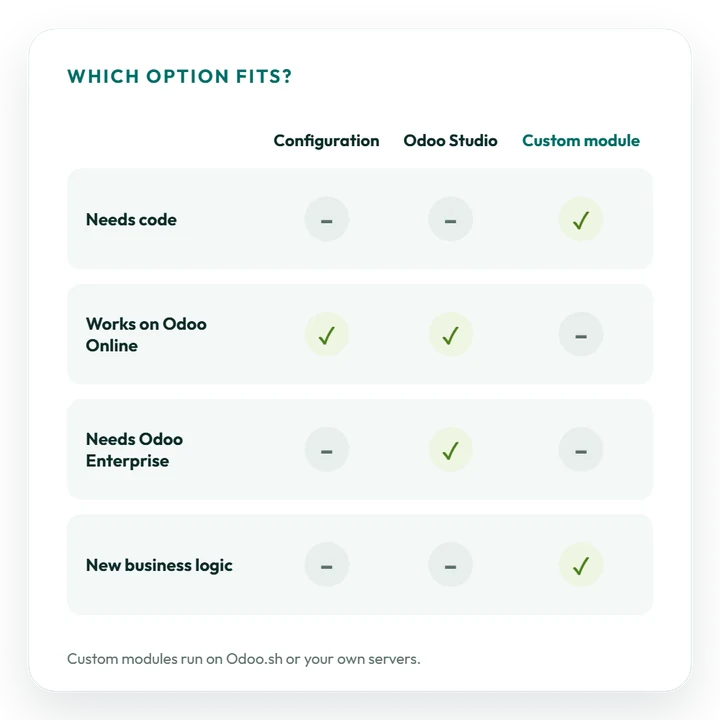
Custom modules cannot run on Odoo Online, which is limited to settings and Studio. Code needs Odoo.sh or a server of your own.
Scope of work
What Do Odoo Customisation Services in Pakistan Cover?
We shape each form, printed document and approval route around how your Pakistan teams operate, without stepping outside what Odoo can carry through an upgrade.
Fields
Forms that fit your data
Capture NTN, sales tax registration or CNIC details on partners, reorder tabs and buttons, and change list columns and pipeline stages to suit each department.
Invoices
Sales tax invoice layouts
Sales tax invoices, credit notes, quotations and delivery challans in your own branding, with space for the FBR invoice number and QR code, edited in Studio or written as QWeb reports.
Approvals
Approval routes and limits
Sign-off steps and value limits for purchase orders, vendor bills, expenses and payments, set per company or department to mirror who authorises what in your business.
Automation
Automated reminders
Send an email, create an activity or update a field when a rule is met, for example a reminder to the accounts team before the monthly sales tax return is due on IRIS.
Reports
PKR reports and dashboards
Pivot tables, charts and saved filters on live Odoo data, totalled in PKR and any foreign currency you trade in.
Security
Access rights and portals
Access rules for each user group, with portal pages and web forms where customers and vendors can check documents and raise requests themselves.
How we work
How Does an Odoo Customisation Project Run?
Every change passes through six steps, and none of it reaches your live database before your key users approve it.
Pakistani clients deal directly with the consultants and developers in our Pakistan office, working Pakistan hours online or on site by arrangement, and the scope is agreed in writing first.
Odoo module development →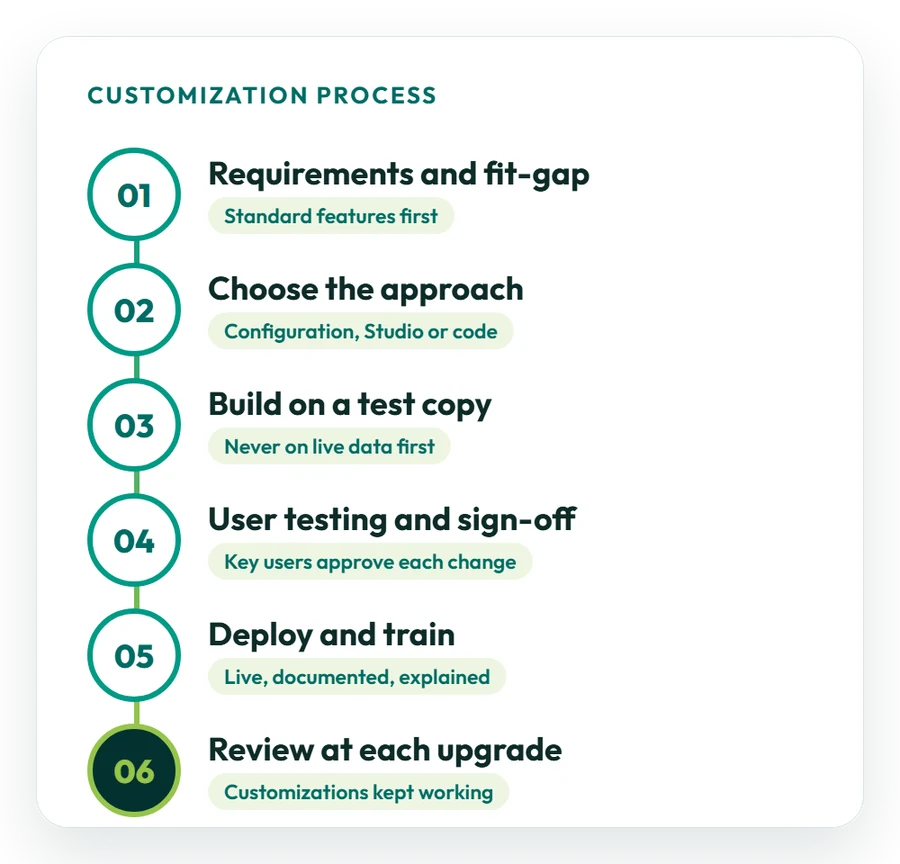
01
Review your process
We go through each process with you, collect the invoices, forms and reports in use today, and check what standard Odoo and its Pakistan localisation already handle.
02
Choose settings, Studio or a module
Each change is matched to the lightest tool, whether a setting, Odoo Studio or a custom module, and you get a written estimate.
03
Build on a copy of your database
Changes are made on a copy of your database, so live invoices and sales tax records stay unaffected throughout.
04
Testing by key users
Key users check every change with real cases, such as a vendor payment with withholding tax, and sign it off before release.
05
Go live and train
Approved changes are released, documented and explained online, in Urdu or English, to the staff who use them.
06
Review at each upgrade
Every customisation is tested again and adjusted when you move to a newer Odoo version, as part of our Odoo support plans.
Studio vs code
Odoo Studio or a Custom Module: Which Do You Need?
Many requests from Pakistani businesses can be handled in Odoo Studio with no code at all; a custom module is needed only when Odoo must do something new.
For each change we recommend the lightest route and explain the effect on cost and on upkeep at future upgrades.
Studio: fields and views
Add fields such as NTN or a sales tax registration number, reposition buttons and tabs, change list columns and stages, and hide what you do not use.
Studio: automation rules
On a set condition, Studio can send an email, plan an activity or update a record, and from Odoo 20 it can also start an activity plan.
Studio: report layouts
Adjust quotation, sales tax invoice and delivery challan templates in the report editor with your logo, NTN and payment terms.
Studio: approval rules
Block an action, such as validating a high-value vendor bill, until an authorised manager approves it.
Code: new business logic
Custom withholding logic, special pricing or commission formulas, new data models and changes to standard behaviour all call for a custom module.
Code: Community and FBR links
Odoo Community ships without Studio, and on Odoo 17 to 19 a link to FBR digital invoicing or any other system is built in code: see our integration services.
FBR digital invoicing
How Does FBR Digital Invoicing Shape Your Invoice Customisation?
With FBR digital invoicing, the data sent to FBR counts as much as the printed page. Plan custom invoice fields so the details the PRAL API needs still come from standard Odoo fields, and the FBR number and QR code print in the right place. Key points:
- Who: mandatory for sales-tax-registered businesses, corporate and non-corporate; every phase of the SRO 1852(I)/2025 timetable has now passed;
- How: the ERP posts each invoice to the PRAL Digital Invoicing API in real time and FBR returns a unique invoice number;
- On paper: that number is printed with a QR code and the DI logo;
- Integrators: the link runs through an FBR-licensed integrator; PRAL, which is government-owned, integrates free of charge;
- Tier-1 retail: POS receipts show the FBR invoice number and a verifiable QR code;
- Odoo: Odoo 20 adds official FBR e-invoicing; Odoo 17 to 19 need a third-party app or partner development.
Sources: EY on SRO 709(I)/2025 and the PRAL DI API technical documentation. FBR revises these rules often, so confirm the current position with FBR or your tax adviser.
Odoo integration in Pakistan →Pakistan localisation
Which Pakistan Tax Settings Must Customisations Respect?
Every customisation sits on top of Odoo’s Pakistan accounting localisation. Tax, withholding and payroll logic stays standard, so your sales tax and withholding reports remain accurate after each change.
Sales tax
FBR sales tax and IRIS
The Pakistan localisation installs a chart of accounts, sales tax rates and a tax report. Goods carry 18% standard sales tax, and Annex-C and the monthly return are normally filed on IRIS by the 18th. See FBR sales tax due dates.
Withholding
Withholding and provincial tax
Odoo’s localisation includes a withholding tax report. Rates depend on the payment type and Active Taxpayer List status, so we set them with your accountant, together with provincial sales tax on services for PRA, SRB, KPRA or BRA.
Payroll
Payroll, EOBI and social security
Pakistan appears in Odoo’s payroll localisation list, and Odoo 20 adds year-end income-tax adjustments on payslips. EOBI and provincial social security contributions are set up as salary rules. See the Odoo payroll localisations page.
Language
PKR, Urdu and English
PKR as the company currency with the symbol shown before the amount, a July to June fiscal year, workshops in Urdu or English, and invoices and tax documents in English, as Pakistani businesses normally issue them.
Before you start
What Should You Prepare Before an Odoo Customisation Project?
A clear list of changes gives you a firmer estimate and a faster start.
Not sure what to change first? One of our consultants can review your processes and set priorities.
Speak to an Odoo consultant →01
List the changes
Write down each change, why you need it, and whether it is needed at go-live or can wait for a later phase.
02
Share sample documents
Send current sales tax invoices, delivery challans, Excel sheets and screenshots, with a rough sketch of what you want printed.
03
Name a key user per team
Every team needs one person who understands its process in detail and can set aside time for testing.
04
Describe your Odoo set-up
Tell us the Odoo version and edition you run, and whether it is hosted on Odoo Online, Odoo.sh or your own server.
05
Keep standard where you can
Agree which processes your team can follow in standard Odoo, which keeps the change list shorter.
Cost and timing
What Does Odoo Customisation Cost in Pakistan?
Cost tracks scope. A new field, a revised sales tax invoice layout or a single automation rule is a short piece of work; reshaping several workflows or building a custom module takes more time and is normally planned in phases.
What drives cost and timeline
- how many changes there are and which apps they affect;
- whether Studio covers them or code is required;
- how many printed documents change, including FBR number and QR placement;
- the Odoo version, edition and hosting you use;
- the amount of testing and training;
- how changes are kept working through upgrades.
Studio comes with Odoo plans that include it; custom code needs Odoo.sh or your own server. Our indicative Pakistan day rate is US$60–100, not a quote, and the scope is fixed before work starts.
Ask for a proposal →Typical request sizes
These are rough guides only; the scope is fixed in a written estimate after we map your requirements:
- Small change: a new field, a list or form adjustment, or a sales tax invoice layout with the FBR number and QR code;
- Team package: approval rules, automations and a dashboard for one department such as accounts or procurement;
- Multi-app programme: work across several apps, including custom modules, released in stages.
No work begins until you approve a written estimate.
Case studies
Odoo Customisation Work We Have Delivered
All of our published case studies are Saudi projects. The processes they cover, multi-branch retail, e-invoicing, restaurant operations and project billing, work the same way for businesses in Pakistan. Browse all case studies.
Retail
Stock across retail branches
Saudi case study: a perfume retailer received custom stock workflows, additional reports and branch-by-branch monitoring across its shops. See how it was done
Trading
From manual books to e-invoicing
Saudi case study: a steel trader moved to automated ZATCA e-invoicing, a close parallel to FBR digital invoicing in Pakistan. Read the project
Restaurants
Dashboards and automatic purchasing
Saudi case study: a restaurant group got management dashboards and automatic purchase requests linked across Odoo POS, Inventory and Accounting, and cut food waste by 30%. Read how it works
IT services
Quicker project billing
Saudi case study: an IT services firm tied timesheets and milestones to invoicing in Odoo and made project billing 40% faster. Read the billing case study
Why OzonLayer
Why Choose OzonLayer for Odoo Customisation in Pakistan?
Facts you can verify before you contact us.
01
Odoo Silver Partner on odoo.com
OzonLayer IT Services appears as a Silver Partner in the official Odoo partner directory, which also shows references from our clients.
02
Consultants and developers together
Odoo 18 certified functional consultants cover settings and Studio, and our own developers build modules when a change needs code.
03
One team from scope to upgrade
Whoever scopes a change also tests it, trains your users on it and checks it again at each upgrade, so nothing gets lost between people.
04
Run from our Pakistan office
Pakistani projects are handled by consultants and developers at our office in Pakistan (Office-2, First Floor, Bashir Tower, Sector-1, Block-A, New Metro City, Sarai Alamgir), in PKT hours, with on-site visits by arrangement.
Working in another market? See Odoo customisation in the UK, Saudi Arabia or the UAE.
FAQ
Odoo Customization Services in Pakistan: Common Questions
Got a question we have not answered here? Send it to us and we will reply plainly about scope, cost and timing.
Ask about your project
What are Odoo customisation services in Pakistan?
They adjust Odoo to the way a Pakistani business runs: fields, screens, sales tax invoice layouts, approval rules, automated actions, reports and dashboards. OzonLayer, an official Odoo Silver Partner, uses settings and Odoo Studio first and writes custom modules only when nothing else works.
Can Odoo print the FBR invoice number and QR code on invoices?
Yes. When Odoo is connected to FBR digital invoicing, every invoice receives a unique FBR invoice number, and we adjust the sales tax invoice layout so it prints that number with the QR code and DI logo, in your branding.
Will customisation affect our FBR sales tax and withholding reports?
Not when it is planned properly. We leave tax calculation and reporting on Odoo’s standard Pakistan localisation, then retest the sales tax report and the withholding tax report after every change before it goes live.
Can Odoo be customised without coding?
In many cases, yes. Odoo Studio can add fields, change screens and printed reports, and set up automation rules and approval steps with no code. We write a custom module only when Studio cannot deliver what you need.
Can Odoo Online be customised?
To a degree. Odoo Online supports settings and, on plans that include it, Odoo Studio, but it does not accept custom Python modules. If your requirements need code, such as custom withholding logic, the database has to run on Odoo.sh or a server you control.
Can we add approval steps to purchases and payments in Odoo?
Yes. We set up approval steps and value limits on purchase orders, vendor bills, payments, expenses and sales, with separate rules for each company or department, so the right manager signs off before Odoo moves on.
Does customisation make Odoo upgrades harder?
Studio changes and properly written modules can move to new versions, but each customisation still has to be checked at every upgrade. We document every change and keep custom code as small as possible to make that work quicker.
Can Odoo connect to FBR digital invoicing?
Yes. Odoo 20 includes an official FBR e-invoicing integration. On Odoo 17, 18 and 19 the link uses a third-party app or partner development. Either way, invoices pass through an FBR-licensed integrator such as PRAL, which integrates free of charge.
How much does Odoo customisation cost in Pakistan?
It depends on how many changes you need, whether Studio is enough or code is required, the documents involved and your hosting. Our indicative day rate in Pakistan is US$60–100, which is not a quote. Small changes are quick, larger work is phased, and the scope is fixed first.
Do you customise both Odoo Community and Enterprise?
Yes. Odoo Studio is only available in Odoo Enterprise, so on Odoo Community we make changes through configuration and custom modules. Before work starts, we explain which options your edition supports and what each one costs to maintain.
Who handles Odoo customisation projects for Pakistani businesses?
Consultants and developers at our Pakistan office run them in Pakistan hours. Workshops, reviews and testing happen online, in Urdu or English, and on-site visits can be arranged when needed.
Official Odoo Silver Partner
Shape Odoo around how your Pakistan business works
Tell us the screens, invoices or approval routes you want changed, plus your Odoo version and hosting. We will propose the simplest route and send you a scoped proposal.
Pakistan +92 371 0992691 · UK +44 7477 204638 · Email info@ozonlayer.com