Odoo Silver Partner
Odoo Integration Services in Pakistan
We link Odoo ERP to the software around it, so sales orders, receipts, stock levels, invoices and customer records pass between systems without anyone typing them twice. For sales-tax-registered companies in Pakistan, the link that matters most now is FBR digital invoicing.
OzonLayer plans, builds, tests and maintains integrations for Pakistani businesses. We configure Odoo’s ready-made connectors where they fit and write code against the External JSON-2 API or webhooks where they do not. OzonLayer is an official Odoo Silver Partner.
PKR
Pakistan accounts and sales tax
UR / EN
Urdu or English workshops
Silver
Official Odoo partner
Scope
What we connect to Odoo
- FBR digital invoicing via PRAL or a licensed integrator
- Tier-1 retail POS reporting to FBR
- Pakistani online stores and marketplaces
- Banks, Raast and payment gateways
- Courier and delivery companies
- CRM, older ERP and in-house tools
On Odoo Online, the external API comes only with the Custom plan.
Integration scope
Which Systems Can Odoo Integration Connect in Pakistan?
Each connection ends a round of retyping between Odoo and another tool, and we add them flow by flow. Every flow is tested on a copy of your data first, with error alerts and a log so your team can see what moved and when.
Channels
Web shops and marketplaces
Products, prices, stock, customers and orders kept consistent between Odoo and the places you sell online in Pakistan, whether your own web shop or a local marketplace.
Payments
Banks, Raast and gateways
Bank statement imports for PKR and foreign-currency accounts, Raast and 1LINK transfers matched to invoices, and payment gateway links, built custom when no connector exists.
Shipping
Couriers and cash on delivery
Booking, labels, tracking and cash-on-delivery settlements from local courier companies tied to Odoo delivery orders and customer invoices.
FBR
FBR digital invoicing and POS
Each sales tax invoice posted from Odoo to FBR through PRAL or a licensed integrator in real time, with the FBR invoice number and QR code saved on the invoice, and Tier-1 POS receipts reported the same way.
Customers
CRM, marketing and reporting
Leads, contacts, NTN or CNIC details and sales figures kept aligned between Odoo and the CRM, campaign and dashboard tools your teams already use.
Legacy
Older ERP and in-house software
Two-way links to systems that stay in use next to Odoo, for example a group company’s ERP, built on the External JSON-2 API. Read about our Odoo development services.
Our method
How Does an Odoo Integration Project Run?
We follow six stages, and nothing touches your live Odoo database until each flow has passed full end-to-end tests.
Consultants and developers in our Pakistan office lead the work on Pakistan time, online by default, with on-site visits by arrangement and a written plan agreed first.
Explore our Odoo development work →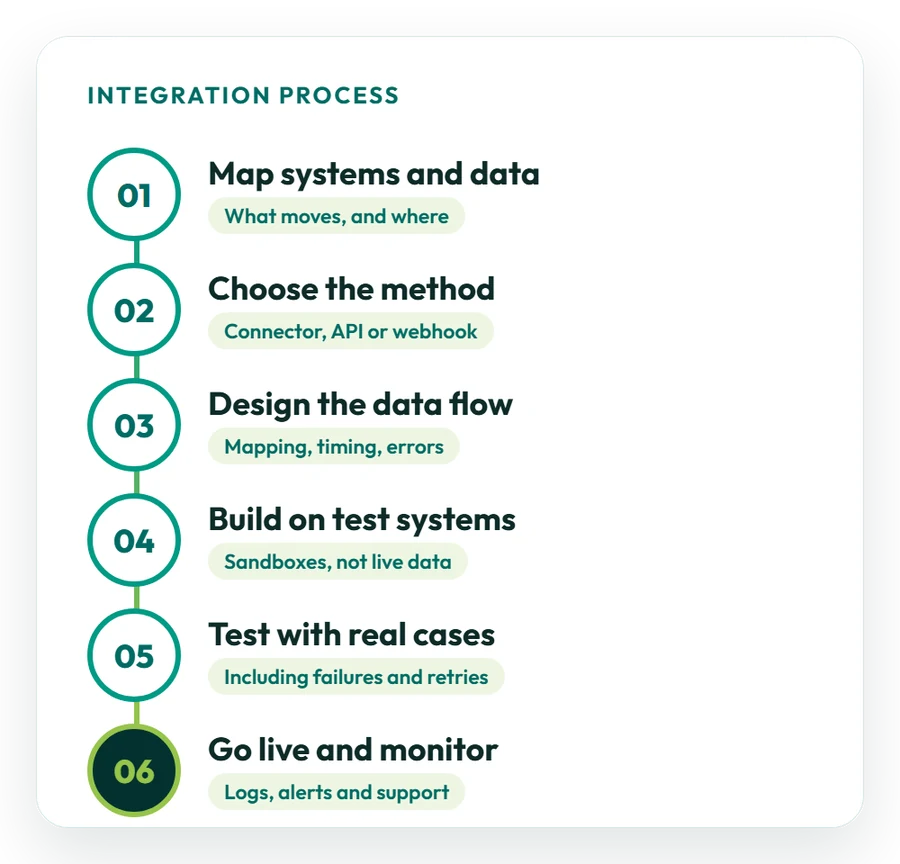
01
List systems and data
We note every application involved and what it exchanges, from orders, stock and receipts to sales tax invoices, FBR responses and customer records.
02
Choose the approach
For each flow we pick a ready connector, the External JSON-2 API, webhooks or file transfer, and send you a written estimate.
03
Specify every flow
We agree which system owns each record, how fields and PKR or foreign-currency amounts translate, the sync frequency and what happens when something fails.
04
Build on test systems
We develop on a copy of Odoo and in the other system’s sandbox, never on live records.
05
Test with real cases
Your staff try everyday problems, such as rejected invoices, cancelled orders, double records and failed payments, before approving the build.
06
Go live and monitor
We turn the link on, review the first live transactions together and keep it running through our Odoo support services.
Integration methods
Which Odoo Integration Method Fits Your Business?
Start with a ready-made connector; write API or webhook code only where nothing suitable exists.
We suggest a method per flow and explain its effect on budget, delivery time and upkeep after go-live. Where an official connector exists we use it first, because it keeps working when Odoo releases a new version.
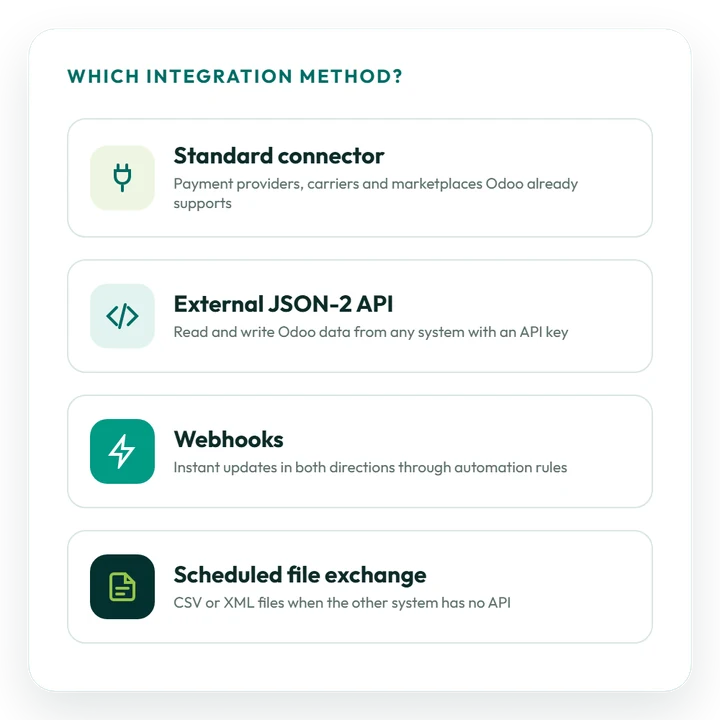
Ready-made connector
Payment providers, carriers, bank links and other connections Odoo already ships, switched on by configuration rather than custom code.
External JSON-2 API
Another application reads and writes Odoo records over HTTP using an API key. It replaces Odoo’s older XML-RPC and JSON-RPC interfaces.
Incoming webhooks
An automation rule gives Odoo a webhook address, so an external system can push an event, like a paid order, the moment it happens.
Outgoing webhooks
When Odoo creates or changes a record, an automation rule sends the details to a webhook on the receiving system.
Scheduled file transfer
CSV or XML files exchanged at fixed times, for older software with no API.
Integration platform
Where many applications are involved, a middleware platform can sit in the centre and still talk to Odoo through its API.
FBR e-invoicing
How Does Odoo Connect to FBR Digital Invoicing?
Every sales tax invoice goes from your ERP to FBR in real time, through PRAL or another FBR-licensed integrator. Odoo has to send complete invoice data and store what FBR sends back. The rules in brief:
- Who: digital invoicing is mandatory for sales-tax-registered businesses, corporate and non-corporate, under SRO 709(I)/2025 and the later phasing in SRO 1852(I)/2025;
- Route: PRAL, the government-owned integrator, connects free of charge, or you can use a private licensed integrator;
- Response: FBR returns a unique invoice number for each invoice;
- Printing: that number is printed with a QR code and the DI logo;
- Odoo versions: Odoo 20 adds an official FBR e-invoicing integration; on Odoo 17, 18 and 19 the link needs a third-party app or custom partner work.
Sources: EY’s alert on SRO 709(I)/2025 and PRAL’s DI API technical documentation. FBR has changed these rules several times, so confirm the position with FBR before planning.
Speak to an integration consultant →Pakistan localisation
Which Pakistan Tax and Payroll Data Must Integrations Carry?
Connections only help when they pass along figures that are already right for Pakistani tax and payroll. Your integrations depend on these localisation settings:
Sales tax
FBR sales tax and the IRIS return
Odoo’s Pakistan accounting localisation brings a chart of accounts, taxes and a tax report. We set up the 18% standard rate and your other rates so Annex-C sales data for the monthly IRIS return comes from posted invoices. See the Odoo 20 release notes.
Provincial tax
Provincial sales tax on services
Services are taxed by the provinces rather than FBR: currently 15% with SRB in Sindh and KPRA in KP, and 16% standard with PRA in Punjab. We map each service line to the right provincial tax before data leaves Odoo.
Payroll
Withholding tax, EOBI and payroll
Withholding tax on supplier payments and salaries is calculated in Odoo for the quarterly IRIS statements, and EOBI and provincial social security contributions are set up as salary rules. Pakistan is on Odoo’s payroll localisation list.
Language
PKR, Urdu and English
PKR as the base currency with the Rs symbol and automatic exchange rates for foreign currencies, business documents in English, and training for your users in Urdu or English.
Getting ready
How Should You Prepare for an Odoo Integration?
Some early homework makes the estimate more accurate and lets development start earlier.
Not sure which link to build first? A consultant can study how your business in Pakistan works and put the integrations in order of value.
See Odoo consulting in Pakistan →01
Name your applications
List every system, who looks after it in your company and the records it needs to share with Odoo.
02
Get API and FBR access
Collect API documents, a sandbox login and, for e-invoicing, your integrator or PRAL test credentials.
03
Settle the master records
Choose the system that owns products, prices, stock, customers and orders as the single source.
04
Size volumes and timing
Tell us roughly how many orders or invoices you process each day, which updates need to be immediate and which can wait for a schedule.
05
Check your Odoo set-up
Tell us your Odoo version, edition and hosting; on Odoo Online the external API needs the Custom plan.
Time and budget
How Much Does Odoo Integration Cost in Pakistan?
Scope sets the price. Switching on a ready-made connector is usually quick work; a custom two-way link takes longer and is normally released flow by flow. Our indicative day rate in Pakistan is US$60–100.
What changes the cost and timing
- the number of systems and record types;
- one-way or two-way sync;
- the quality of the other side’s API and documents;
- transaction volumes and how quickly updates must arrive;
- logging, alerts and failure handling;
- your Odoo edition, version and hosting.
On Odoo Online the API needs the Custom plan, US$13.40 per user a month billed yearly in year one, and some connectors cost extra. Every integration is quoted separately in writing.
Request a proposal →Typical integration sizes
Use these as a rough guide; we confirm the estimate after data mapping:
- Connector set-up: switching on a payment, courier or bank link that Odoo already supports;
- One-way integration: records sent in a single direction, such as web shop orders into Odoo;
- Two-way integration: several record types synchronised both ways and released flow by flow.
We start only after you approve a written estimate that lists each flow, its direction, how often it runs and who owns it after go-live.
Case studies
Odoo Integration Work We Have Delivered
All of our published case studies are Saudi projects. The work in them, multi-branch retail, e-invoicing, restaurants and project billing, matches processes that companies in Pakistan run in Odoo too. View every case study.
Retail
Online store and CRM links
Saudi project: Match Perfumes connected Odoo with Salla and Salesforce through direct REST APIs and real-time webhooks. Read the Match Perfumes case study
E-invoicing
ZATCA Phase 2
Saudi project: Industrial Steel Solutions sends Odoo invoices for ZATCA clearance and reporting, the same real-time pattern FBR digital invoicing follows. Read the ZATCA case study
IT services
From projects to billing
Saudi project: DPSIT brought sales, projects, timesheets and accounting together in Odoo, and project billing became 40% faster. Read the DPSIT case study
Restaurants
From POS to the ledger
Saudi project: Sweet & Salty handles point of sale, recipes, buying and accounts in one Odoo database. Read the restaurant case study
Why OzonLayer
Why Choose OzonLayer for Odoo Integration in Pakistan?
Points you can verify before we talk.
01
Official Odoo Silver Partner
Our Silver Partner status and customer references appear on our page in Odoo’s partner directory, so you can check them yourself.
02
Consultants and developers together
Consultants map your process, including FBR sales tax and digital invoicing, and our in-house developers write the API or webhook code.
03
Support after go-live
The team that built your integration monitors it, repairs faults and updates it whenever Odoo or the other system changes.
04
Run from our Pakistan office
Pakistani projects are handled by consultants and developers at our office (Office-2, First Floor, Bashir Tower, Sector-1, Block-A, New Metro City, Sarai Alamgir) during PKT hours.
Working in another market? See Odoo integration in the UK, Saudi Arabia or the UAE.
FAQs
Odoo Integration Services in Pakistan: Common Questions
Still have a question? Send it to us and you will get a straight reply about scope, timescale and cost.
Ask an integration consultant
What are Odoo integration services in Pakistan?
Odoo integration services link Odoo ERP with the other software a Pakistani business relies on, such as FBR digital invoicing, Tier-1 POS reporting, banks, payment gateways, couriers, online stores and CRM tools. Data then flows between them automatically instead of being keyed in twice.
Can Odoo connect to FBR digital invoicing?
Yes. Odoo posts each sales tax invoice in real time to FBR through PRAL or another FBR-licensed integrator, then stores the FBR invoice number and prints it with a QR code. Odoo 20 includes an official FBR integration; Odoo 17 to 19 need a third-party app or custom work.
Is FBR digital invoicing mandatory in Pakistan?
Yes, for sales-tax-registered businesses. SRO 709(I)/2025 extended digital invoicing to corporate and non-corporate registered persons, and the phased dates set by SRO 1852(I)/2025 have now all passed. FBR has revised these rules several times, so confirm your position with FBR or your tax adviser.
Which software can Odoo integrate with in Pakistan?
Odoo can integrate with FBR digital invoicing, Tier-1 POS reporting, banks and Raast payments, payment gateways, couriers, web shops, marketplaces, CRM and marketing tools, older ERP systems and in-house software. We use ready-made connectors where they exist and custom API work elsewhere.
What is Odoo’s External JSON-2 API?
The External JSON-2 API is the external interface Odoo introduced in version 19. Outside systems call Odoo models over HTTP and authenticate with an API key. It takes over from the XML-RPC and JSON-RPC API, which Odoo has deprecated. We use it for new custom integrations.
Do XML-RPC or JSON-RPC integrations need rebuilding?
Yes, they should be scheduled for replacement, because Odoo has deprecated the older API. We usually move existing connectors to the JSON-2 API during an Odoo upgrade or as part of a support plan, so the links keep working on newer Odoo versions.
Can Odoo POS report sales to FBR for Tier-1 retailers?
Yes. Odoo 20 adds real-time FBR POS reporting for Tier-1 retailers; older versions need integration work. Each receipt must carry the FBR invoice number and a verifiable QR code, printed for the customer.
How much does Odoo integration cost in Pakistan?
Cost depends on the number of systems and record types, one-way or two-way sync, the other API’s quality, volumes and monitoring. Our indicative day rate in Pakistan is US$60–100, not a quote. Ready-made connectors are quick; custom two-way links are delivered in phases.
How do you keep Odoo integrations secure?
Each integration gets its own Odoo user and an API key with restricted rights. Traffic is encrypted, every exchange is logged, and we test against a copy of your data before anything goes live. Keys can be revoked at any time.
What if an Odoo integration stops working?
Every failed message is logged with its cause, retried when that is safe and reported to your team, so no data disappears unnoticed. On a support plan, our developers monitor the integration, fix failures and resend any affected records for you.
Do you have an Odoo integration team in Pakistan?
Yes. Our consultants and developers work from our office in Pakistan on Pakistan time (PKT). Meetings run online, on-site visits are arranged when needed, and workshops can be in Urdu or English.
Official Odoo Silver Partner
Link Odoo to the systems your Pakistan business runs on
Let us know which applications you want linked, which records should move and how frequently. We will check the APIs and FBR requirements and send a scoped proposal.
Pakistan +92 371 0992691 · UK +44 7477 204638 · Email info@ozonlayer.com