Official Odoo Silver Partner
Odoo Migration Services in Pakistan
An Odoo migration takes your records from QuickBooks, Tally, Peachtree (Sage 50), Excel or an older Odoo release into current Odoo while the business keeps trading. For a Pakistani company that means NTN and STRN details, PKR opening balances and sales tax figures that agree with your last return on IRIS.
OzonLayer, an official Odoo Silver Partner, plans and runs these moves for companies across Pakistan, from Excel-based traders to firms upgrading a customised Odoo database with modules of their own.
PKR
Pakistan accounts and sales tax
EN / UR
English documents, Urdu or English training
Silver
Odoo partner status
Scope
What we bring into Odoo
- Excel workbooks and QuickBooks or Tally files
- Peachtree (Sage 50) company data
- Older Odoo databases, up to Odoo 20
- In-house and third-party modules
- Sales tax and PKR balances, agreed to the ledger
- Switches between Odoo Online, Odoo.sh and your own server
Every move is tried first on a copy of your data, never on the live system.
What we move
What Do Odoo Migration Services in Pakistan Cover?
We bring your records and trading history across, then prove each total before anyone starts working in Odoo.
Accounts
From QuickBooks, Tally, Peachtree and Excel
Customer and supplier lists with NTN and STRN, items, unpaid invoices and PKR opening balances loaded into Odoo, then tied back to your latest sales tax return.
ERP
Leaving a legacy ERP
Masters, open documents and whichever history you want to keep are taken from your existing ERP as Odoo goes live. See Odoo implementation in Pakistan.
Upgrade
Moving to a newer Odoo release
An older Odoo database brought forward, up to Odoo 20, after a trial upgrade on a copy, with the production run on a date you sign off.
Modules
Porting custom modules
Modules written in-house or bought from third parties are rewritten for the new release, so nothing holds up the database upgrade. More on Odoo development in Pakistan.
Tax
Onto Pakistan accounting
Databases built on home-made tax settings moved onto Odoo’s Pakistan chart of accounts, sales tax and withholding taxes, which we configure and extend where your returns need it.
Hosting
Changing your hosting
Switching between Odoo Online, Odoo.sh and a server you control, for example when a custom module or an FBR connector cannot run on Odoo Online.
How we work
How Does an Odoo Migration Project Run?
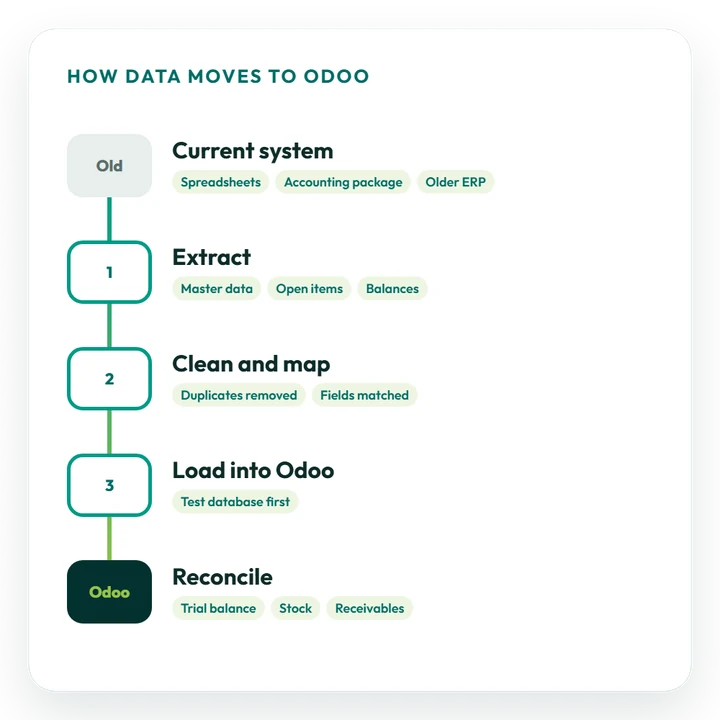
There are six stages, and your live books stay untouched until a full trial run has been checked and approved.
Our Pakistan team runs the project on Pakistan time (PKT), with online meetings, a written plan up front and on-site visits by arrangement.
Read about our Odoo consulting →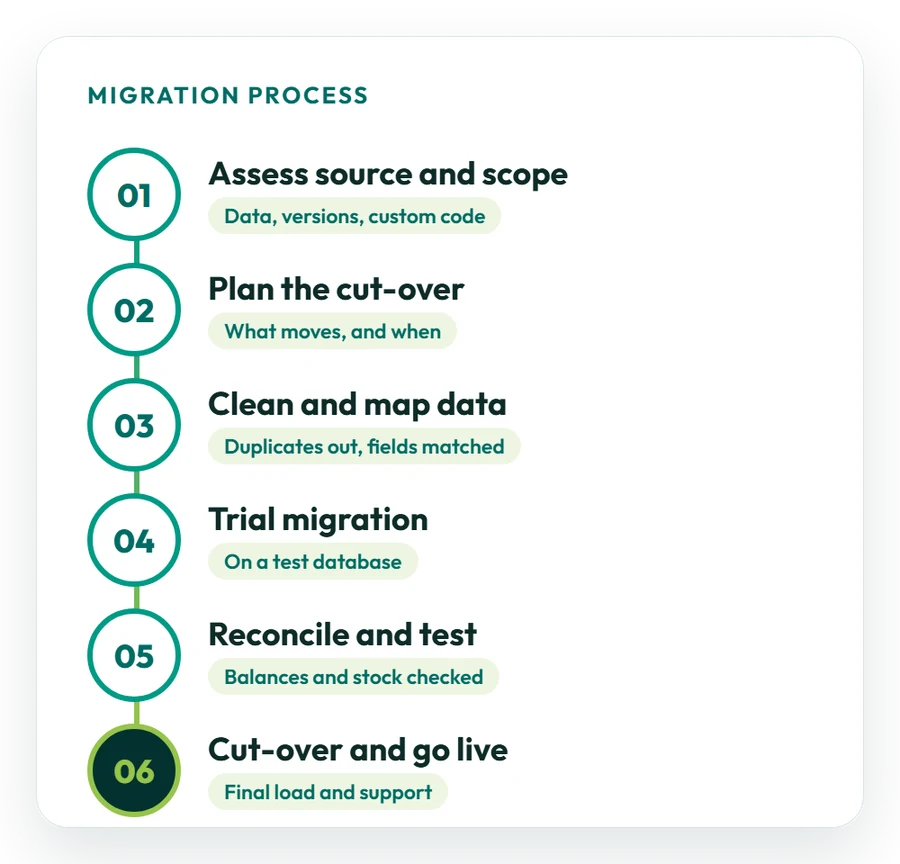
01
Review your current system
We look at the source software, how clean its data is, any Odoo version and edition, plus customisations and connected tools.
02
Agree scope and cut-over
Together we fix what moves (masters, open items, balances, history), pick a cut-over date in your July–June year and give you a written estimate.
03
Cleanse and map fields
Duplicates and dead records go, and every field, NTN, STRN, CNIC and PKR amounts among them, is mapped to its place in Odoo.
04
Do a trial run
The data load or database upgrade, with the ported modules, runs first on a test copy of Odoo.
05
Reconcile and user-test
We agree the trial balance, sales tax, stock, debtors and creditors, while your key users try out their daily work.
06
Go live on the agreed date
On the agreed date the final load or production upgrade runs, and Odoo support specialists then handle the aftercare.
What moves
What Data Is Moved into Odoo?
Move everything you need to trade on day one, then weigh how much old history is worth bringing.
Your finance and operations leads sign off the scope, keeping FBR and provincial tax records in mind, before we extract anything.
Master data
Customers and suppliers with NTN and STRN, items, price lists, the Pakistan chart of accounts and sales tax codes, cleaned first.
Open transactions
Unpaid sales invoices and supplier bills, open sales and purchase orders, and jobs still running on cut-over day.
Opening balances
Trial balance, stock quantities and values, and PKR and foreign-currency bank balances, all agreed to the old books.
History
Past years brought in line by line or as summaries, depending on audit and tax-record needs and the state of the old data.
Documents
Contracts, SECP and tax registration papers, product photos and scanned files linked to the records they relate to.
Users and access
Accounts, roles and rights set up per department, so every user can sign in and work properly from day one.
FBR digital invoicing
Should You Migrate Before Connecting to FBR Digital Invoicing?
FBR digital invoicing is mandatory for sales-tax-registered businesses, so the system you move to must post invoices to FBR. Clean NTN, STRN and tax-code data is what that connection relies on. In outline:
- Legal basis: SRO 69(I)/2025 rewrote Chapter XIV of the Sales Tax Rules, and SRO 709(I)/2025 extended e-invoicing to all corporate and non-corporate registered persons;
- Timetable: under SRO 1852(I)/2025, large companies, public companies and importers were reported to start from 1 November 2025, and all other registered persons by 31 December 2025;
- Connection: the ERP sends each invoice to FBR in real time through a licensed integrator; PRAL, which is government-owned, integrates free of charge;
- Invoice output: FBR returns a unique invoice number, printed on the invoice with a QR code;
- In Odoo: Odoo 20 adds FBR e-invoicing and Tier-1 POS reporting; on Odoo 17 to 19 it needs a third-party app or partner development.
Sources: EY’s alert on SRO 709 and PRAL’s DI API technical documentation. FBR has revised these rules several times, so confirm the current position with FBR before you set dates.
Odoo integration in Pakistan →Pakistan localisation
What Must a Pakistan Migration Carry Across?
We test a Pakistani migration against the tax, payroll and currency set-up in Odoo, not just the number of records loaded. The areas we reconcile:
Sales tax
FBR sales tax and the IRIS return
Odoo’s Pakistan accounting module brings a chart of accounts, taxes and a tax report. We set up 18% standard-rated sales tax on goods so figures feed the monthly return filed on IRIS by the 18th. See FBR’s sales tax due dates.
Withholding
Provincial tax and withholding
Services are taxed by the provinces (PRA, SRB, KPRA, BRA), not by FBR. Odoo carries withholding taxes and a withholding report, and we tag accounts with your accountant for the quarterly statements on IRIS.
Payroll
Payroll, EOBI and social security
Pakistan is on Odoo’s payroll localisation list. We bring across employee records, salary tax, EOBI and provincial social security contributions, and Odoo 20 adds year-end income-tax adjustments on payslips. See Odoo’s payroll localisations.
Currency
PKR, July–June year, Urdu and English
PKR as the company currency, a fiscal year running from 1 July to 30 June, invoices and reports in English as Pakistani firms normally use, and user training in Urdu or English.
Before you start
How Should You Prepare for an Odoo Migration?
A little preparation shortens the project and makes cut-over day calmer.
Switching from another system? Our implementation consultants plan the Odoo set-up and the data transfer as a single project.
Odoo implementation in Pakistan →01
List what you run
Note your current software or Odoo version, its edition, where it is hosted, any custom modules and linked apps.
02
Clean your records
Remove duplicate or dormant customers, suppliers and items before we pull the first extract.
03
Decide on history
Settle with your finance team which years come over in detail and which arrive as balances.
04
Pick the cut-over date
Stay clear of month-end, the 30 June year-end, the 18th sales tax filing date and your busy seasons.
05
Name your testers
Choose key users to agree balances and try their routine work on the trial run.
Cost and timing
What Does Odoo Migration Cost in Pakistan?
Scope sets the price. A lightly customised database usually upgrades quickly, while years of history, many custom modules or several integrations mean a longer project and more than one trial run.
What drives cost and timing
- which system you are leaving and how clean its data is;
- how many records and years of history come across;
- how many custom modules and integrations you run;
- how far your Odoo version is from the target;
- setting up Pakistan taxes, payroll and FBR invoicing;
- the testing and training your team needs.
Our indicative day rate in Pakistan is US$60–100, not a quote. Odoo Enterprise includes Odoo’s upgrade service for standard apps; we handle custom modules and data work. A scoped plan comes first.
Get a written proposal →Typical migration types
Use these as a rough guide; we confirm the estimate after the assessment:
- Standard upgrade: a database on standard apps and Studio changes moved to a later release;
- Upgrade with custom code: custom modules and integrations ported and tested alongside the database;
- Move to Odoo: data from Excel, QuickBooks, Tally, Peachtree or another ERP loaded as part of an implementation.
Nothing starts until you hold a written estimate.
Case studies
Projects Where We Moved Clients onto Odoo
Every case study we have published so far is a Saudi Arabian project. Multi-branch retail, e-invoicing, restaurant POS and project billing work the same way for Pakistani companies on Odoo. Browse all case studies.
Retail
Merging branch data
Saudi project: Match Perfumes brought stock, sales, buying and finance from separate branch records together in one Odoo database. Read the Match Perfumes case study
Trading
Off manual bookkeeping
Saudi project: Industrial Steel Solutions replaced spreadsheets and hand-keyed entries with Odoo Accounting and ZATCA e-invoicing. Read the steel trading case study
Restaurants
Replacing manual tills
Saudi project: Sweet & Salty moved from manual tills and spreadsheets to Odoo POS, Inventory, Purchase and Accounting, and cut food waste by 30%. Read the restaurant case study
IT services
Out of scattered tools
Saudi project: DPSIT moved sales, projects, timesheets and accounting from spreadsheets and separate apps into Odoo, and now bills projects 40% faster. Read the DPSIT case study
Why OzonLayer
Why Choose OzonLayer for Odoo Migration in Pakistan?
Points you can verify for yourself before any call.
01
Official Odoo Silver Partner
You can confirm our Silver Partner listing and the customer references on it in Odoo’s public partner directory.
02
Consultants and developers in one team
Odoo 18 certified consultants review your data, tax set-up and processes, and our own developers port the custom modules.
03
Help after cut-over
The team that moved your system stays on hand after go-live to fix issues and answer your staff’s questions.
04
Run from our Pakistan office
Pakistani projects are run on PKT by consultants and developers at our office (Office-2, First Floor, Bashir Tower, Sector-1, Block-A, New Metro City, Sarai Alamgir), online or on site by arrangement.
Working in another market? See Odoo migration in the UK, Saudi Arabia or the UAE, or visit our Odoo migration services page.
FAQs
Odoo Migration Services in Pakistan: Common Questions
Have another question? Contact us and we will give you a straight answer on scope, timing and price.
Speak to a migration consultant
What are Odoo migration services in Pakistan?
They move a Pakistani business onto Odoo from Excel, QuickBooks, Tally, Peachtree (Sage 50) or another ERP, or upgrade an older Odoo database to a newer release. Data is cleaned, mapped and reconciled, including PKR balances and sales tax accounts, before go-live.
Can you migrate from QuickBooks, Tally or Peachtree to Odoo?
Yes. We extract customers, suppliers, items, open invoices and bills, stock and opening balances from QuickBooks, Tally, Peachtree (Sage 50) or Excel, map them to Odoo, and reconcile the totals against the old ledger before you switch over.
How do you check sales tax balances after moving to Odoo?
We agree opening balances and sales tax accounts to your trial balance and to the last monthly return filed on IRIS, and confirm that customer and supplier NTN and STRN details came across complete before go-live.
Can Odoo connect to FBR digital invoicing after migration?
Yes. Odoo 20 adds FBR e-invoicing for registered businesses. On Odoo 17 to 19 there is no official module, so a third-party app or partner development is used. Invoices reach FBR through a licensed integrator, and FBR returns an invoice number printed with a QR code.
What is the difference between an Odoo upgrade and an Odoo migration?
An upgrade takes an existing Odoo database to a later version. A migration brings data from different software, such as Tally or QuickBooks, into Odoo. Both are tested on a copy first, and a migration also needs field mapping and data cleansing.
How much does Odoo migration cost in Pakistan?
It depends on scope. Our indicative day rate in Pakistan is US$60–100, not a quote. Odoo bills its own licences, from US$7.25 per user per month in the first year on yearly billing, and Enterprise includes Odoo’s upgrade service for standard apps.
What happens to custom modules during an Odoo upgrade?
Each custom module has to be ported to the new version and tested before the database itself can be upgraded. We review every module, port and test it, then run a complete trial upgrade before production is touched.
Can we move to Odoo in the middle of the July–June tax year?
Yes. We load opening balances at a month-end cut-over, bring the year-to-date figures across and keep the July–June fiscal year in Odoo, so annual accounts and returns still cover the full tax year. A 1 July start is simpler if timing allows.
How long does an Odoo migration take in Pakistan?
A standard upgrade is usually short. Moves with custom modules, integrations or several years of history take longer and get more than one trial run. We confirm the timeline in a written plan once we have reviewed your data.
Will Odoo be unavailable during the migration?
Only for a short cut-over window while the production database is moved. We schedule it away from month-end, the 18th sales tax filing date and your busiest trading days, and tell your users in advance.
Can you run an Odoo migration for a Pakistani business remotely?
Yes. Data reviews, trial runs and sign-offs happen online with our Pakistan team on PKT, and consultants can visit on site by arrangement. Workshops and user training run in Urdu or English.
Official Odoo Silver Partner
Move to Odoo with a certified Silver Partner
Let us know which software you use now, how many years of history to keep and any deadlines you face. We will look at your data and send back a migration plan.
Pakistan +92 371 0992691 · UK +44 7477 204638 · Email info@ozonlayer.com