
Official Odoo Silver Partner
Odoo Migration Services in the UAE
Odoo migration moves a business onto Odoo, or onto a newer version of Odoo, without losing data or stopping daily work. For UAE businesses that means VAT balances, open invoices and tax registration numbers arriving complete and reconciled, ready for the VAT201 return and e-invoicing.
We move UAE businesses onto Odoo from spreadsheets, accounting packages and legacy ERPs, and upgrade existing Odoo databases together with their custom modules. OzonLayer is an official Odoo Silver Partner.
AED
UAE chart of accounts and VAT
AR / EN
Arabic and English documents
Silver
Official Odoo partner
Scope
What we move to Odoo
- Spreadsheet and accounting-package data
- Records from legacy ERP systems
- Version upgrades as far as Odoo 20
- Custom and third-party modules
- VAT balances and open items, reconciled in AED
- Moves between Odoo Online, Odoo.sh and self-hosting
We rehearse each migration on a test database before the live switch-over.
What we migrate
What Do Odoo Migration Services in the UAE Include?
Migration moves your data and your history to Odoo, checked figure by figure before you switch over.
Accounting
From spreadsheets and accounting software
Customers, suppliers, products, open invoices and opening balances moved into Odoo, with tax registration numbers and VAT balances checked against your last return.
ERP
Moving from another ERP
Master data, open items and the history you decide to keep, transferred from a legacy ERP as you go live on Odoo. Read about Odoo implementation for UAE companies.
Upgrade
Upgrading your Odoo version
Your database taken to a newer release, as far as Odoo 20, upgraded on a test copy first and in production on a date you approve.
Code
Upgrading custom modules
In-house and third-party modules rewritten for the target release, so the database upgrade can go ahead. Read about our Odoo development in the UAE.
Tax
Onto the UAE localisation
Older databases that used custom tax settings moved onto Odoo’s UAE chart of accounts, taxes and VAT201 report, so reporting matches the FTA format.
Hosting
Changing where Odoo runs
Moving between Odoo Online, Odoo.sh and your own servers, for instance when you need custom modules that Odoo Online cannot run.
How we work
What Are the Steps in an Odoo Migration Project?
Each migration runs through six stages, and nothing changes in your live system until a complete rehearsal is checked and signed off.
Our Riyadh team, an hour behind UAE time, runs the migration online, with site visits by arrangement and a written plan first.
See our Odoo consulting services →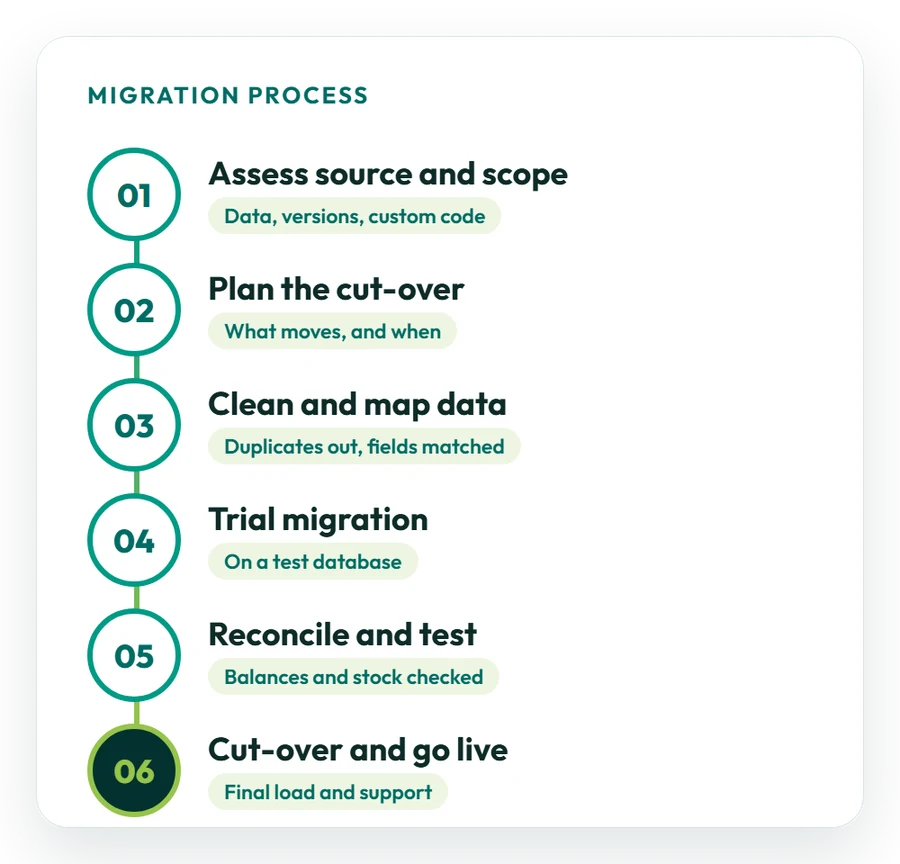
01
Assess the source and scope
We check the source system, its data quality, Odoo version and edition, customisations and integrations.
02
Plan the switch-over
We settle what will move (master data, open items, balances and history), the switch-over date and the plan, then send a written estimate.
03
Clean and map the data
Duplicate and out-of-date records are removed, and each field, TRNs and AED amounts included, is matched to Odoo.
04
Run a trial migration
A test copy receives the data load or database upgrade first, along with the upgraded custom modules.
05
Reconcile and test
We reconcile the trial balance, VAT, stock, receivables and payables, and your key users test their everyday tasks.
06
Switch over and go live
The final data load or production upgrade runs on the agreed date, and our Odoo support team takes over the aftercare.
What moves
Which Data Moves to Odoo in a Migration?
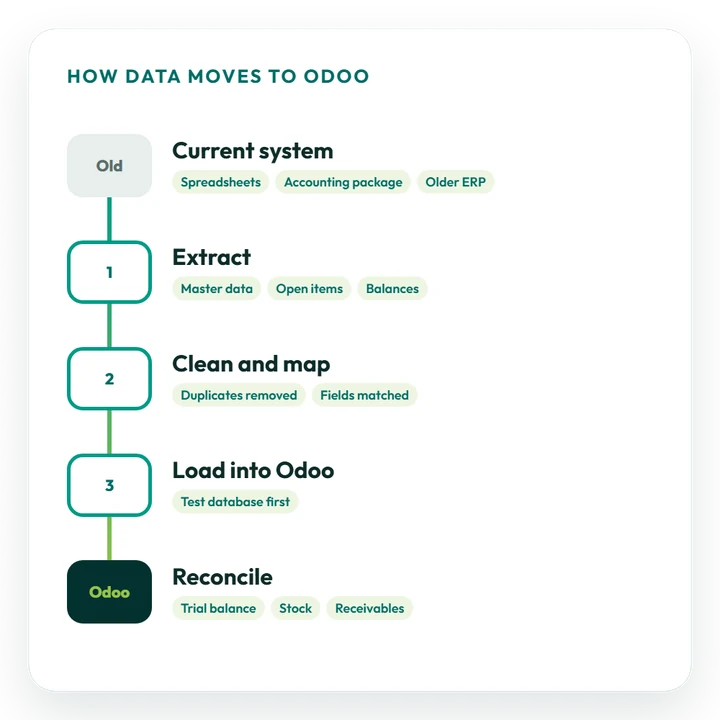
Bring across what you need to trade from the first day, then decide how much history is worth the effort.
Scope is agreed with your finance and operations leads, with VAT and Corporate Tax records in mind, before any extract is taken.
Master data
Customers, suppliers, products, price lists, the UAE chart of accounts and VAT taxes, cleaned before loading.
Open transactions
Outstanding invoices and bills, open sales and purchase orders, and work in progress on the switch-over date.
Opening balances
Trial balance, stock quantities and valuation, and AED and foreign-currency bank balances, agreed back to the old system.
History
Earlier transactions moved in full or as summaries, depending on reporting and tax-record needs and old data quality.
Documents
Files such as contracts, trade licences, product images and scans, attached to the records they belong to.
Users and access
User accounts, roles and permissions configured per team, so each person has the right access on the first day.
UAE e-invoicing
Should You Migrate Before UAE E-Invoicing Starts?
Moving to Odoo or to a newer version before your e-invoicing date gives you time to test. Clean customer tax numbers and tax codes migrated now are the data your Accredited Service Provider will need later. The timetable:
- 1 July 2026: pilot with selected businesses, and voluntary adoption opens;
- 1 January 2027: mandatory for businesses with revenue of AED 50 million or more;
- 1 July 2027: mandatory for businesses with revenue below AED 50 million;
- 1 October 2027: mandatory for government entities;
- How it works: invoices are exchanged in the PINT AE format over the Peppol network through an Accredited Service Provider that each business appoints, and invoice data is reported to the Federal Tax Authority.
Dates from Ministerial Decisions No. 243 and No. 244 of 2025; see the Ministry of Finance e-invoicing programme and EY’s summary. Check the Ministry of Finance for any later changes before you plan.
Odoo integration in the UAE →UAE localisation
What Do UAE Migrations Need to Carry Across?
A UAE migration is checked against the tax, payroll and currency settings of the new system, not only the record counts. These are the areas we reconcile:
VAT
VAT and the VAT201 return
Odoo’s UAE localisation sets up 5% standard-rated, zero-rated, exempt and reverse-charge VAT, and builds the VAT201 return in the FTA’s format for filing on EmaraTax. See the Odoo UAE documentation.
Corporate Tax
Corporate Tax reporting
Odoo’s corporate tax report shows net profit, exempt income, allowable deductions and disallowed expenses. Odoo ships no default tax categories, so accounts are tagged during set-up with your accountant.
Payroll
UAE payroll and WPS
The UAE payroll localisation covers housing and transport allowances, annual leave, end-of-service provisions, WPS salary reports and the Emiratisation report. See the UAE payroll documentation.
Arabic
AED, Arabic and English
AED as the company currency with automatic exchange rates, users working in Arabic or English, and customer documents in either language, or in a bilingual layout where you need one.
Before you start
What Should You Prepare Before an Odoo Migration?
Some groundwork up front makes the migration quicker and the switch-over safer.
Leaving another system for Odoo? Our implementation team plans your Odoo set-up and the data move as one project.
Odoo implementation for the UAE →01
Take stock
Record your current system or Odoo version, edition, hosting, custom modules and connected applications.
02
Tidy your data
Clear out duplicate or inactive customers, suppliers and products before we take the first extract.
03
Choose how much history
Agree with your finance team which years move line by line and which move as balances.
04
Set the switch-over date
Avoid month-end, year-end, VAT201 filing deadlines on EmaraTax and your peak trading weeks.
05
Appoint testers
Pick key users to check balances and run their daily tasks on the trial migration.
Timeline and cost
What Does Odoo Migration Cost for a UAE Business?
Cost follows scope. A standard database with few changes is normally a quick upgrade; projects with many custom modules, integrations or years of history take longer and get more than one rehearsal.
What affects cost and timeline
- the source system and the quality of its data;
- the volume of records and how much history moves;
- the number of custom modules and integrations;
- the gap between your current and target Odoo versions;
- moving onto the UAE localisation and payroll;
- the testing and training needed.
For Odoo Enterprise, Odoo’s upgrade service covers standard apps; custom modules and data work are part of our scope. You receive a scoped plan first.
Request a proposal →Common migration sizes
Treat these as a guide; the estimate is confirmed once the assessment is done:
- Standard upgrade: a database using standard apps and Studio changes taken to a newer release;
- Upgrade with custom code: custom modules and integrations upgraded and tested together with the database;
- Migration to Odoo: data brought over from spreadsheets, an accounting package or another ERP during an implementation.
No work begins until you have a written estimate.
Case studies
Businesses We Have Moved onto Odoo
Our published case studies come from projects in Saudi Arabia. The processes behind them, multi-branch retail, e-invoicing, restaurants and project billing, are the same ones UAE businesses run in Odoo. See all case studies.
Retail
Multi-branch data migration
Saudi case study: Match Perfumes combined stock, sales, purchasing and finance from separate branch records into a single Odoo system. Read the Match Perfumes study
Trading
From manual bookkeeping
Saudi case study: Industrial Steel Solutions left spreadsheets and manual entries behind for Odoo Accounting with ZATCA e-invoicing. Read the steel trading study
Restaurants
From manual tills
Saudi case study: Sweet & Salty swapped manual tills and spreadsheets for Odoo POS, Inventory, Purchase and Accounting. Read the restaurant study
IT services
From spreadsheets and tools
Saudi case study: DPSIT brought sales, projects, timesheets and accounting out of spreadsheets and separate tools into Odoo. Read the DPSIT study
Why OzonLayer
Why Choose OzonLayer for Odoo Migration in the UAE?
Facts you can check before you speak to us.
01
Official Odoo Silver Partner
Our Silver Partner status is public in Odoo’s partner directory, alongside the customer references on our partner profile.
02
Functional and technical skills together
Certified consultants check your data, VAT set-up and processes, while our own developers upgrade the custom modules.
03
Support after switch-over
The people who migrated your system remain available after go-live to resolve issues and answer your team’s questions.
04
Delivered remotely for the UAE
Projects for UAE businesses are run online by our teams in Riyadh, London and Pakistan, with working hours that overlap the UAE business day.
Working in another market? See Odoo migration in the UK, Saudi Arabia or our Odoo migration services page.
FAQs
Odoo Migration in the UAE: Your Questions Answered
Still have a question? Get in touch and we will reply with a plain answer on scope, timing and cost.
Talk to a migration specialist
What are Odoo migration services in the UAE?
They move a UAE business onto Odoo from spreadsheets, accounting packages or another ERP, or upgrade an existing Odoo database to a newer version, with data checked and reconciled before go-live.
What data can be moved into Odoo?
Customers, suppliers, products, price lists, open invoices and bills, stock levels, opening balances and the history you choose, plus employee data if you move payroll to Odoo.
How do you make sure VAT balances are correct after migration?
We reconcile opening balances and VAT accounts against your last VAT return and trial balance, and check that customer and supplier tax registration numbers moved across before go-live.
Should we migrate before UAE e-invoicing starts?
If possible, yes. E-invoicing is mandatory from 1 January 2027 for businesses with revenue of AED 50 million or more and from 1 July 2027 for others. Migrating earlier gives time to test invoice data with your Accredited Service Provider.
How does an Odoo upgrade differ from a migration to Odoo?
An upgrade moves an existing Odoo database to a newer version. A migration moves data from another system into Odoo. Both need testing, but a migration also needs data mapping and cleaning.
Is upgrading Odoo free?
For Odoo Enterprise, the upgrade service for standard apps is included in the subscription. Custom modules, data cleaning, configuration changes and training are not, and are part of a partner’s scope.
What happens to custom modules when Odoo is upgraded?
Custom modules must be ported and tested for the new version before the database can be upgraded. We review each module, port it and run a full test upgrade first.
Can older Odoo databases move onto the UAE localisation?
Yes. Where an older database used custom tax settings, we plan the move to Odoo’s UAE chart of accounts, taxes and reports as part of the upgrade, and check historical reports with your accountant.
How long does a UAE Odoo migration take?
A standard upgrade is usually a short project. Migrations with custom modules, integrations or years of history take longer and are rehearsed more than once. We confirm the timeline after reviewing your data.
Will Odoo be unavailable during the migration?
There is a short cut-over window when the production database is unavailable. We plan it outside busy periods and away from VAT filing dates.
Do you work with UAE businesses remotely?
Yes. Data reviews, test migrations and sign-offs run online with our team in Riyadh, London and Pakistan, during hours that overlap the UAE business day.
Official Odoo Silver Partner
Plan your move to Odoo with a certified partner
Tell us what you use today, how much history you want to keep and any dates you are working to. We will review your data and send a migration plan.
Phone (UK) +44 7477 204638 · Phone (Saudi Arabia) +966 56 434 5818 · Email info@ozonlayer.com